Private CA
CertIntel can act as an issuing certificate authority for an organization. It signs certificates for internal hostnames, single-label names, IP addresses, client authentication and code signing, with no domain validation, because the organization is the authority for those names. The requester brings a certificate signing request (CSR), or asks CertIntel to generate the key pair and downloads the result as a PFX or PEM bundle. Every certificate it issues lands in the unified inventory at once (source Private CA), so expiry alerts, scheduled reports and the certificates page cover it, and every certificate points at a certificate revocation list (CRL) that CertIntel publishes.
The CertIntel Agent (1.3.81 or later) can request, install, renew and deploy Private CA certificates exactly as it does ACME certificates: the private key is generated on the device and never leaves it.
Private CA is a plan feature: it is included in the Business and Enterprise plans (and in workspaces without a plan); other plans show Private Ca is not included in this subscription. on the page. A platform administrator can override the entitlement for a workspace.
Two deployment models
| Model | What CertIntel holds | What you do | Trust rollout |
|---|---|---|---|
| Subordinate (bring your own root; recommended) | The issuing CA key pair only, encrypted at rest with the same protection as ACME account keys. | Sign the CSR CertIntel generates with your existing root (AD CS, an offline OpenSSL root, an HSM appliance) using a subordinate CA template, then upload the signed certificate and chain. | None: your devices already trust your root. The root key never touches CertIntel. |
| Standalone | A root CA and an issuing CA beneath it, both keys encrypted at rest. | Install the root certificate on the devices that must trust it. | Required: distribute the root from /pki/{ca_id}/root.pem with your own Group Policy, Intune or MDM deployment; see Distributing a Standalone root CA. |
Both models produce one issuing CA per organization (several are allowed) that signs end-entity certificates. CA keys are never exportable through the API or the dashboard, and there is no HSM or KMS integration: an organization that needs the issuing key in hardware should keep its root offline (subordinate mode) and treat the CertIntel-held issuing key as the revocable, replaceable half. A CA always belongs to one organization; there is no tenant-wide CA (see Not provided).
Setting up a CA
Open Settings → Private CA and choose Create an issuing CA (permission
private_ca.create; the API is POST /api/v1/private-cas). The form asks for:
- Mode -
subordinateorstandalone. The form explains the choice under the select (platform builds after 2026.10.28): Standalone: no existing PKI needed; CertIntel creates and holds the root, and you must install that root on clients (the CertIntel Agent can do this). Bring your own root: this CA is signed by your existing PKI, so clients that already trust your root trust it with no rollout. - Issuing CA common name (1–64 characters), an optional Organization name in subject and an optional Label.
- Key algorithm -
ec_p256(default),ec_p384,rsa_2048,rsa_3072orrsa_4096. P-384 CAs sign with SHA-384, the rest with SHA-256. - Longest certificate validity (days) - 1–825, default 365: the longest certificate this CA will issue.
- CRL validity (hours) - 1–8760, default 168: how long each published CRL is valid.
- Name constraints - permitted and excluded DNS names (suffixes) and IP
ranges (CIDR). An empty permitted list leaves that name type unrestricted;
an exclusion always wins. A permitted
corp.exampleadmitscorp.example,host.corp.exampleand*.corp.example. Constraints are enforced in software at every issuance, whatever the signing template copied. - Standalone only: Root common name (defaults to
<common name> Root), Root validity (years) (default 20) and Issuing CA validity (years) (default 10, clamped to the root). register_trust(API; on by default) registers the chain's root as an organization trust anchor on the Trusted CAs page, with its own expiry alerts suppressed, so chain reviews on certificate, site and endpoint pages validate to it.
Create CA reads Creating root and issuing CA… while it works (platform
builds after 2026.10.28); the form also opens directly from
/private-cas?create=1, and an empty Overview offers Create a Private
CA next to Add an endpoint and Set up an agent when you hold
private_ca.create and the plan includes Private CA.
Bring your own root: signing the CSR
A subordinate CA is created pending signature. The CA page shows the
two steps 1. Sign the CSR with your root CA and 2. Install the signed
certificate, with the CA's own id filled in. Download the CSR from the page
(GET /api/v1/private-cas/{id}/csr.pem, saved as certintel-ca-<id>.csr).
It requests basicConstraints CA:TRUE, pathlen:0, keyUsage keyCertSign,
cRLSign, a subject key identifier and any name constraints.
Active Directory Certificate Services
Run every command in a Command Prompt (cmd.exe) window on the CA server or a domain-joined machine with the AD CS tools, not PowerShell: the same commands typed into PowerShell have produced the wrong root certificate.
- Submit the CSR with the built-in Subordinate Certification Authority template (or a copy of it). Pick your CA when prompted.
The subordinate CA template normally requires CA-manager approval, so this
ends with Certificate request is pending: Taken Under Submission and
prints a RequestId. Note it; no certificate file has been written yet.
2. Approve the request: open the Certification Authority console
(certsrv.msc), expand the CA, open Pending Requests, right-click the
request, All Tasks → Issue.
3. Fetch the issued certificate:
or, in the console, Issued Certificates → double-click the certificate → Details → Copy to File… → Base-64 encoded X.509 (.CER). CertIntel reads DER and Base-64 files alike. 4. Export the root certificate (also in Command Prompt):
or, in the console, right-click the CA → Properties → View Certificate →
Details → Copy to File… → Base-64. If the issuing CA is itself
subordinate to an offline root, export that root too.
5. On the CA page, upload certintel-ca.cer and root.cer (several files at
once; DER, Base-64 .cer/.pem/.crt and .p7b are accepted) or paste
them as PEM, then click Activate CA. Nothing needs converting.
OpenSSL offline root
With OpenSSL 3, -copy_extensions copy carries the CA extensions from the CSR:
openssl x509 -req -in certintel-ca-<id>.csr -CA root.pem -CAkey root.key -CAcreateserial \
  -days 1825 -sha256 -copy_extensions copy -out certintel-ca.pem
Upload certintel-ca.pem and root.pem on the CA page.
What activation checks
Activation (POST /api/v1/private-cas/{id}/activate with a PEM
certificate_bundle) checks that one of the certificates is for CertIntel's
key, that it is a CA certificate allowed to sign certificates and CRLs, that it
is currently valid, and that every extra certificate chains upward with a
verified signature. Each certificate in the chain must itself be a CA
certificate, carry keyCertSign if it has a keyUsage, and be currently
valid; an expired root or a CA:FALSE intermediate is refused with a 422
naming the certificate. Unrelated certificates are ignored. A bundle without
the self-signed root is accepted; the issuing certificate is then the
registered trust anchor. The CA becomes active and publishes its first CRL.
Activating again (a renewed CA certificate, or the CSR re-signed under a different root) replaces the certificate and chain. When the chain's root changes, the trust anchor CertIntel registered for the old root is removed from the Trusted CAs page, provided no other CA uses it; a root you added there by hand is left in place.
Standalone: distributing the root
GET /pki/{ca_id}/root.pem (or root.crt for DER) is public. Windows:
certutil -addstore Root root.pem, or a GPO on Trusted Root Certification
Authorities. Debian/Ubuntu: copy to /usr/local/share/ca-certificates/<name>.crt
and run update-ca-certificates. RHEL: /etc/pki/ca-trust/source/anchors/,
then update-ca-trust. macOS: security add-trusted-cert -d -r trustRoot -k
/Library/Keychains/System.keychain root.pem. An enrolled Agent can do this
for its own machine; see trusting the CA.
For a fleet, follow Distributing a Standalone root CA with Group Policy or
Intune: it walks through the download and
fingerprint check, the Group Policy and Intune profiles, the Linux and macOS
stores, verification on a device, and what to do when the root is rotated or
the CA deleted.
On platform builds after 2026.10.28 the CA page of a standalone CA has a
fold-out Roll the root out to a fleet (Group Policy, Intune, CertIntel
Agent). It opens with a link to
Distributing a Standalone root CA with Group Policy or Intune
and the statement Nothing is pushed from this dashboard, and the CertIntel
Agent never installs a root on its own., then offers the root.crt download
with its SHA-256 fingerprint, one-sentence Group Policy and Intune summaries,
the Agent path (certintel private-ca trust <id>, approved locally on each
device) and the certutil, PowerShell and openssl commands to verify the
installed copy. The dashboard does not push the root to devices; you
distribute it with your own tooling and verify on the device. Agent 1.5.0 and
later report whether their machine trusts the root, so the CA page can show
where the rollout has arrived (see trust status).
Issuing certificates
Issue a certificate on the CA page (permission private_ca.issue; the
button reads Issuing certificate… while it works) offers two ways to get a
key pair under Key pair:
- Bring a CSR (recommended). Generate the key pair where the certificate will live and paste only the CSR; the platform never sees the private key.
openssl req -new -newkey ec -pkeyopt ec_paramgen_curve:P-256 -nodes \
  -keyout web01.key -out web01.csr -subj "/CN=web01.corp.example" \
  -addext "subjectAltName=DNS:web01.corp.example,DNS:web01,IP:10.1.2.3"
- Let CertIntel generate the key pair. Give the common name and/or the subject alternative names (and optionally a key algorithm). CertIntel generates the key, issues, and stores the private key encrypted on the issued certificate so you can download the certificate with its key as a PFX, a PEM bundle or a bare key, until you discard it. This is for people who would rather not run OpenSSL; Agents always generate keys locally.
The same fields are available as POST /api/v1/private-cas/{id}/issue:
{
  "csr_pem": "-----BEGIN CERTIFICATE REQUEST-----\n...",
  "profile": "server",
  "sans": ["web01.corp.example", "web01", "10.1.2.3"],
  "validity_days": 365,
  "hostname": "WEB01"
}
| Field | Meaning |
|---|---|
Profile / profile |
server (serverAuth, default), client (clientAuth), both, or code_signing (codeSigning). |
Subject alternative names / sans |
DNS names (wildcards and single labels allowed) and IP addresses, at most 100. Private addresses (RFC 1918, IPv6 ULA, loopback and link-local) are allowed; the CA's name constraints still apply. For a CSR they override its own names; when omitted, the CSR's names are used, falling back to its CN. Ignored for code_signing. Email and URI names are not supported. |
common_name |
Only when CertIntel generates the key pair (a CSR's CN is used otherwise); required for code_signing, which has no SANs. At most 64 characters. |
Key algorithm / key_algorithm |
Only when CertIntel generates the key pair; defaults to ec_p256 for the TLS profiles and rsa_2048 for code_signing (what Authenticode tooling expects). |
Validity (days) / validity_days |
Defaults to the lower of the CA's maximum and 365; never above the CA's maximum, always clamped to the CA's own expiry. 825 days is the hard ceiling. |
Host (informational) / hostname |
Free text recorded with the certificate, such as the computer name. |
A CSR's key must be RSA of at least 2048 bits, EC P-256/P-384/P-521 or
Ed25519, and its signature must verify. Issued certificates carry
basicConstraints CA:FALSE, keyUsage digitalSignature (plus
keyEncipherment for RSA), the profile's extended key usage, the subject
alternative names (TLS profiles), a CRL distribution point and an AIA
caIssuers URL. The response carries certificate_pem, chain_pem,
fullchain_pem, crl_url, the serial, SANs, validity and the inventory
certificate_id; private_key_pem is present only on that response and only
when CertIntel generated the key.
Code-signing certificates
A code_signing certificate names a signer (a person, team or pipeline), not
a host: its subject is the common name, it carries the codeSigning extended
key usage and no subject alternative name, and the CA's name constraints do
not apply to it. Install it with its key where signing happens (Windows:
import the PFX into the personal store, then Set-AuthenticodeSignature or
signtool sign). Machines that run the signed code must trust the chain's
root; PowerShell's AllSigned policy additionally needs the signer
certificate in Trusted Publishers. Use RSA keys for Authenticode; some
signing tools do not handle ECDSA.
Download formats
The Formats menu in the Issued certificates table and
GET /api/v1/private-cas/{id}/certificates/{cert_id}/export?format=… offer:
format |
Content | Needs |
|---|---|---|
pem |
The certificate | read access |
fullchain |
Certificate followed by the issuing chain (PEM) | read access |
chain |
The issuing chain only (PEM) | read access |
der |
The certificate as binary DER (.cer) |
read access |
p7b |
Certificate and chain as a PKCS#7 bundle | read access |
key |
The platform-generated private key, unencrypted PKCS#8 PEM | private_ca.issue or .update; key still held |
bundle |
Key, certificate and chain in one PEM file | same |
pfx |
Key, certificate and chain as PKCS#12 (Download PFX (.pfx) with a PFX password of 8+ characters; POST the same path with {"format": "pfx", "password": "…"}) |
same |
Key downloads are recorded in the activity log. Discard stored key
(DELETE …/certificates/{cert_id}/private-key) forgets the platform's copy
once the key is installed; the certificate stays valid and listed, only the
key formats stop working. A certificate issued from a CSR never has a key to
export.
Who may issue
- Users need
private_ca.issuein the CA's organization. The built-in Certificate Issuer role holds it (withorganizations.readandcertificates.read), as does Administrator; Operators and Viewers do not. See Organizations, users & roles. - Agents and integration keys need an organization-confined
writekey that a user withprivate_ca.updatehas explicitly allowed, from the CA page (Who may request certificates → Allow), the Agents page (Allow private CA) orPOST /api/v1/api-keys/{key_id}/private-ca-issuance. Enrolling an Agent never grants this. An allowed key may request certificates from every CA in its organization, is rate-limited per key, and cannot see, configure or revoke anything. See API keys.
Revocation and CRLs
Revoke in the issued-certificates table
(POST /api/v1/private-cas/{id}/certificates/{cert_id}/revoke, permission
private_ca.revoke) takes an optional RFC 5280 reason (unspecified,
key_compromise, ca_compromise, affiliation_changed, superseded,
cessation_of_operation, certificate_hold, privilege_withdrawn), flags
the inventory row as revoked and re-signs the CRL at once. Revoked
certificates stay on the CRL until seven days after they expire.
Every CA publishes, without authentication and cacheable for five minutes:
| Path | Content |
|---|---|
/pki/{ca_id}/crl |
DER CRL, the URL in every issued certificate |
/pki/{ca_id}/crl.pem |
The same CRL as PEM |
/pki/{ca_id}/ca.crt, /pki/{ca_id}/ca.pem |
The CA certificate (the AIA caIssuers URL) |
/pki/{ca_id}/chain.pem |
The CA certificate followed by every issuer above it |
/pki/{ca_id}/root.pem, /pki/{ca_id}/root.crt |
The self-signed root, when known |
These URLs use the platform's public origin, which has to stay reachable from
every device that validates these certificates. /pki/ is exempt from the
workspace IP allowlist and is served on the ingest host as well. A deleted CA
stops publishing. A scheduled task re-signs any CRL before it runs out, so an
untouched CRL never goes stale; a standalone root also publishes a CRL, which
is always empty. You can watch a CA's CRL with a
CRL monitor like any other
distribution point.
OCSP is not provided. Relying parties that require OCSP are out of scope; every issued certificate carries a CRL distribution point.
Lifecycle and permissions
- Settings and name constraints on the CA page (
PATCH
  /api/v1/private-cas/{id}
) change the label, longest validity, CRL validity and name constraints for the next issuance; Disable issuance / Enable issuance switch the CA's status. A disabled CA issues nothing but keeps publishing its CRL. - Delete this CA (
DELETE /api/v1/private-cas/{id}, permissionprivate_ca.delete) soft-deletes the CA and, for standalone, its root. Issued certificates keep working until they expire, but the CRL is no longer published and nothing can be issued or revoked. The trust anchor on the Trusted CAs page is left in place; remove it there when the last certificate is gone. - Permissions are
private_ca.read(part of Viewer),.create,.update(configure, activate, disable, decide which keys may issue),.delete,.revokeand.issue. Administrator holds all of them; a custom role can hold any subset. - Every action is in the activity log (
private_ca.create,.activate,.issue,.revoke,.key_download,.key_discard, … andapi_key.private_ca_issue_enabled/_disabled).
Rotation
On a platform build that offers it, an issuing CA is rotated before it gets
too close to its own expiry: a successor CA takes over new issuance, and
the old CA becomes Retiring and later Retired. The CA list shows
succeeded by
- When. A scheduled task checks every 6 hours. A CA with automatic
rotation on is rotated once a full certificate of its longest validity plus
a 30-day margin no longer fits before the CA expires. Automatic rotation
reads On - rotates on or after
… ; Turn automatic rotation off changes it to Off - rotate it yourself before(API: auto_rotateonPATCH /api/v1/private-cas/{id}, defaulttrue). - Rotate now (
POST /api/v1/private-cas/{id}/rotate, permissionprivate_ca.update) starts a rotation at once. A CA that has already been rotated is refused (This CA has already been rotated; rotate its successor instead.), as is one that is not active. - Standalone. The successor is a new issuing CA with a new key, signed by
the same root, named
<CN> G<n>(generation n), with the same name constraints and CRL settings, its validity clamped to the root. It is active at once (Rotated. This successor issues new certificates; the previous CA keeps issuing and publishing its CRL until it expires.). Because the root is unchanged, devices that trust the root need nothing new. - Bring your own root. The platform creates the successor's key and CSR; the successor shows Awaiting signed certificate and the old CA Rotation awaiting signature. Open the successor, download its CSR, sign it with the same root and upload the signed certificate, exactly as when setting up the CA. Until then the current CA keeps issuing; the upload makes the successor active and the old CA retiring.
- Retiring. New certificates and new assignments use the successor, and the issuer menus offer only active CAs. A retiring CA still issues to anyone who asks, with validity clamped to its own expiry, and keeps publishing its CRL until it expires. Then it is Retired (This CA has expired and issues nothing. Its last CRL stays published.).
- Older and locked Agents. Agent 1.5.0 and later follow the successor (see
rotation on the Agent). Agents before
1.5.0 keep renewing from the retiring CA until it expires and then stop
renewing, as does an Agent whose configuration lock is on. The retiring
CA's page lists them:
host(s) still renewed from this retiring CA after the rotation - needs Agent 1.5.0 or unlock to follow rotation. - When rotation is refused. The root itself is never rotated
automatically. When the root expires too soon for a successor signed by it,
the CA page shows Cannot rotate: The root of this CA expires on
, too soon for a successor signed by it; create a new CA (with a new root) and move to it. and the activity log repeats the warning weekly. A standalone CA whose own lifetime is shorter than its longest certificate plus the margin is refused too: lower its maximum certificate validity, or create a CA with a longer validity. Replacing the root is a manual move to a new CA; see rotation: a new root. - Alerts. The events Private CA rotated and Private CA rotation
awaiting signature (group Private CA) notify destinations that subscribe
to them; they are ticked by default only on new destinations. See
Alerts & notifications. The activity log records each step
(
private_ca.rotation_started,.successor_created,.successor_activated,.retiring,.retired,.rotation_root_expiring).
Using a Private CA from the Agent
An enrolled Windows or Linux Agent (1.3.81 or later) can issue, install, renew and deploy Private CA certificates through the same workflows, storage destinations, modular steps, renewal history and reporting as ACME. The Agent generates the key pair on the device, sends only a CSR, validates the returned certificate against the request and the pinned CA, and stores the chain where the ACME path stores it. Check-ins are reported under the task name CertIntel Private CA.
Enabling it for an Agent
Approving an Agent does not by itself let it use a Private CA: the Agent's key must also be allowed, and the Agent only learns about either when it next asks the platform. What that takes depends on the Agent release. The same pattern - the platform offers, the Agent accepts locally - is used for dashboard-assigned workflows, which can name an allowed Private CA as the issuer.
Agent 1.3.93 and later with platform build 2026.10.28:
- Approve the Agent. After install-token enrollment the device is pending approval on the Agents page; click Approve (see Install tokens & enrollment).
- Allow the Private CA for that Agent: tick Also allow Private CA
issuance while approving, or click Allow private CA later. On
platform builds after 2026.10.28 the Approve form shows that checkbox
(unchecked by default) when the Agent's organization has an active issuing
CA and you hold
private_ca.update; ticking it approves and allows in one action and writes the same activity event as the Allow button, with the flash Agent approved and allowed to request certificates from the private CA. followed by when the Agent will notice. For later changes the row keeps its Allow private CA / Forbid private CA button (the row shows may request certificates once allowed), and Who may request certificates on the CA's page does the same. Either way it needs theprivate_ca.updatepermission and a subscription that includes Private CA. - The Agent notices on its own. As soon as a pending Agent's first
platform call succeeds it probes Private CA availability, sends a heartbeat
and keeps heartbeating about every minute for 15 minutes. Every heartbeat
answer tells it whether its key may request certificates and how many
active CAs exist; when that disagrees with what the Agent has cached it
re-probes at once. An Allow private CA within about 15 minutes of
approval is therefore seen within about a minute. A later change is picked
up at the next hourly heartbeat, or immediately with
certintel private-ca
   refresh
(elevated prompt on Windows,sudoon Linux) or a service restart. - Read the state in the wizard. Until the CA is usable, the Windows
Certificate Wizard and the Linux terminal interface wizard list the
issuer as a disabled entry that says why: CertIntel Private CA – waiting
for administrator approval, – not allowed for this agent (ask an
administrator to Allow private CA), – no active issuing CA is offered to
this agent yet or – availability unknown (see certintel status --json).
The terminal interface shortens these to – awaiting approval, – not
allowed for this agent, – no active issuing CA yet and – availability
unknown with the advice in its help line, and its overview rows read not
allowed for this agent · an administrator can Allow private CA and
awaiting administrator approval in the CertIntel dashboard. The entry is
hidden only when the platform does not offer the feature (
unsupported) or has not been asked yet.certintel status --jsonreportsapproval_pendingandprivate_ca.status. - Create the certificate: choose CertIntel Private CA (internal names,
no DNS validation) under Names & authority, or run one
certintel workflows createcommand.
Agent 1.3.92 and earlier:
- Approve the Agent as above.
- Allow private CA as above. This is always a separate click.
- Make the Agent notice. The Agent re-asks about once an hour, so with no
further action the choice appears within the hour. To use it now, run
certintel private-ca refreshfrom an elevated prompt (Windows) or withsudo(Linux), or restart the service (CertIntelAgenton Windows,certintel-agent.serviceon Linux). Confirm withcertintel private-ca listorcertintel status --json(fieldprivate_ca.status):availablelists the CAs;forbiddenmeans step 2 has not happened yet or the subscription lacks the feature. Neither the Windows app nor the Linux terminal interface shows the forbidden state; the issuer choice is simply absent until the probe saysavailable. - Create the certificate. CertIntel Private CA (internal names, no DNS
validation) now appears under Names & authority in the Windows
wizard, in the Linux terminal interface wizard and in
private-ca list. For a command-line setup see the IIS + Private CA example.
Availability and gating
Nothing can be issued until the platform says this Agent may use the
feature. The service probes GET /api/v1/private-cas/agent/all at start,
after enroll or register, and about hourly afterwards (Agent 1.3.93 and
later also the moment they notice they were approved, and whenever a
heartbeat answer disagrees with the cached state), and caches the answer with
the credential (a key replacement or unregister discards it). certintel status
--json reports the outcome under private_ca:
private_ca.status |
Meaning | Effect |
|---|---|---|
available |
The key is allowed; the list holds the active CAs (possibly none). | CertIntel Private CA (internal names, no DNS validation) appears as an issuer in the Windows wizard and the Linux TUI wizard, and in private-ca list. |
forbidden |
The key has not been allowed (see Enabling it for an Agent), or the subscription lacks Private CA. | Agent 1.3.93 and later list a disabled not allowed for this agent entry; Agent 1.3.92 and earlier show no option anywhere. No error noise; the reason is in private_ca.detail. |
pending (Agent 1.3.93 and later) |
The Agent is still waiting for approval (HTTP 428). | Disabled waiting for administrator approval entry; private_ca.detail reads Waiting for administrator approval in the CertIntel dashboard (CertIntel HTTP 428) and approval_pending is true. Re-probed as soon as approval is noticed. |
unsupported |
Older platform. | Same as absent. |
error |
Network or server error. | Retried soon; nothing is offered unless an earlier probe said available. |
If the feature is withdrawn after certificates were issued, the installed
certificates stay in place and keep being monitored, renewal fails with
CertIntel Private CA is not available to this agent any more … and waits for
the next probe, and nothing falls back to ACME. certintel private-ca refresh
probes now; certintel private-ca list prints the cached availability and CAs.
Configuring a Private CA certificate
In the Windows wizard, choose the Private CA under Names & authority; the
DNS validation step is skipped. In the Linux TUI, a on the Workflows
screen (N before Agent 1.3.88) offers the same choice.
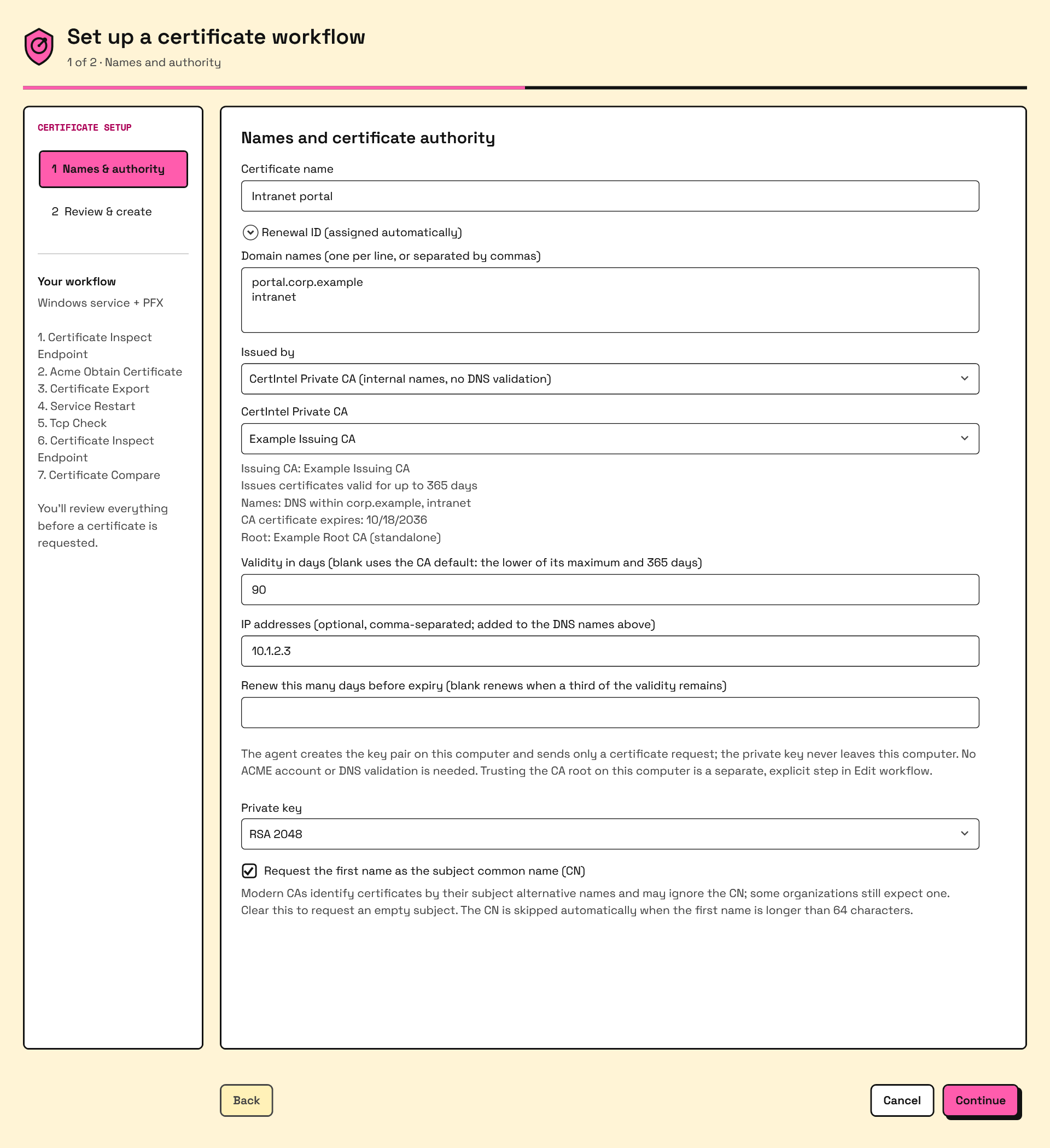
Windows: the Private CA replaces the ACME account fields and the DNS validation stage. The screenshot follows your wiki theme; click it to enlarge.
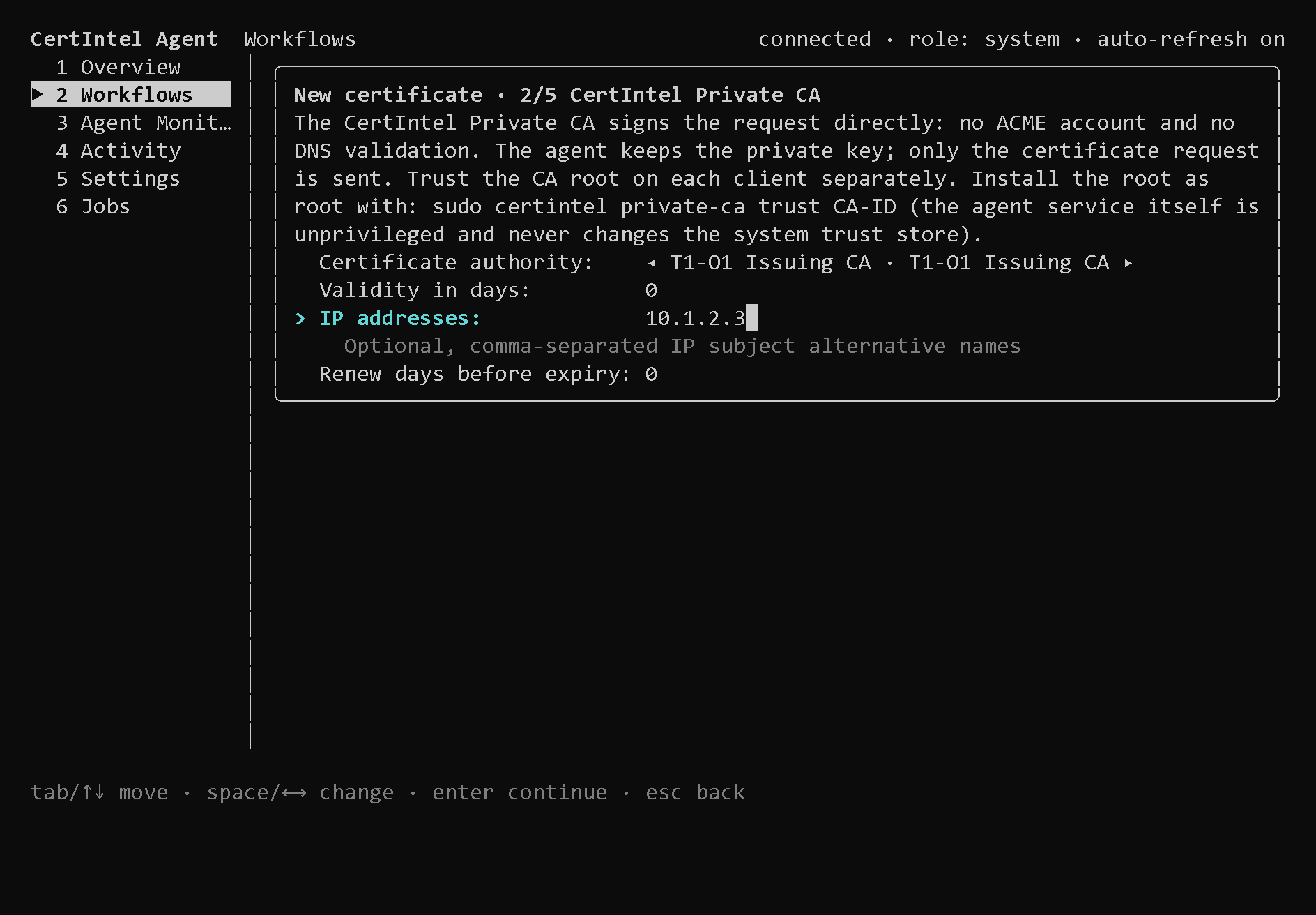
Linux: the terminal interface wizard page for the Private CA (100x30 terminal). The intro repeats the service's trust hint.
In the configuration, a certificate selects its issuer with issuer
(configurations written before 1.3.81 omit it and keep using ACME):
{
"id": "intranet-portal",
"friendly_name": "Intranet portal",
"issuer": "private-ca",
"private_ca": {
"api_base": "https://api.certin.tel",
"ca_id": "4f7a6f3c-2d0e-4d1e-9f0b-6a0c2d3e4f50",
"ca_fingerprint_sha256": "…64 hex characters…",
"validity_days": 90,
"ip_addresses": ["10.1.2.3"],
"renew_before_days": 30,
"profile": "server"
},
"account_id": "",
"domains": ["portal.corp.example", "intranet"],
"key_type": "ec256",
"workflow_id": "intranet-portal-workflow",
"enabled": true
}
| Field | Meaning | Validation |
|---|---|---|
issuer |
acme (default when absent) or private-ca. |
Anything else is refused; private_ca is refused on an ACME certificate. |
private_ca.api_base |
The CertIntel API origin the CA belongs to. | HTTPS origin; must match the connected origin at issuance. |
private_ca.ca_id |
The issuing CA. | UUID. |
private_ca.ca_fingerprint_sha256 |
SHA-256 of the issuing CA certificate, recorded when the CA was chosen. | Optional; a CA replaced under the same id is detected and issuance refused until the certificate is updated. |
private_ca.validity_days |
Requested validity. | 0 for the CA default, or 1–825, not above the CA's maximum. |
private_ca.ip_addresses |
IP subject alternative names in addition to domains, or on their own (Agent 1.5.0+). |
Valid, unique IP addresses. Private ranges (RFC 1918, ULA, loopback, link-local) are allowed; the CA's name constraints still apply. |
private_ca.renew_before_days |
Renew this many days before expiry. | 0 (renew when a third of the validity remains) or 1–825, shorter than the validity. |
private_ca.profile (Agent 1.5.0+) |
What the certificate may authenticate: server (TLS server, the default when omitted), client (TLS client, for example mutual TLS, VPN or 802.1X) or both. |
One of the three. A change applies from the next issuance. |
domains |
DNS names; single-label names and wildcards are accepted. Agent 1.5.0 and later accept an empty list when private_ca.ip_addresses names at least one address. |
Lowercase ASCII; no DNS delegation is required. |
account_id |
Must be empty. |
key_type, omit_common_name, deployment plans, modular workflows, renewal
windows and monitors apply to both issuer kinds. The certificate-level
profile (the CA's ACME profile) and preferred_chain are ACME-only; the
Private CA profile is private_ca.profile. See
certificate parameters.
Certificate profile and IP-only certificates (Agent 1.5.0+). The Windows
Certificate Wizard and the Linux terminal interface wizard have a
Certificate profile choice: TLS server (default), TLS client (mutual
TLS, VPN, 802.1X) or TLS server and client. A client or server-and-client
certificate carries the clientAuth extended key usage. The DNS names may be
left empty when the certificate names IP addresses; the terminal interface
then asks for at least one IP address. On the command line use
certintel workflows create … --issuer private-ca --private-ca-profile
client and --ip-addresses 10.1.2.3,10.1.2.4 (alias --ip); --domains is
optional when --ip-addresses names an address. A
dashboard assignment offers the same as
Certificate profile (Server (TLS server authentication), Client (TLS
client authentication, e.g. mTLS) or Server + client) and allows empty
names with IP addresses, for an Agent that reports the feature; for an older
Agent the form reads Server: this agent does not report private-ca-profile
support (Agent 1.5.0+).
IP addresses always need the Private CA. An ACME certificate that names an IP
address is refused, in the dashboard with IP addresses need the private CA:
'
Issuance, renewal and revocation
Before contacting the platform the Agent refuses locally when the CA is not
active or about to expire, its fingerprint differs from the pinned one, the
requested validity exceeds the CA maximum, or a name violates the CA's name
constraints; local refusals never consume the per-key rate limit. It then
generates the key, builds a CSR with the DNS and IP names (and the first name
as CN unless omit_common_name), posts it once with the certificate profile
(server before Agent 1.5.0), validates the leaf (public key, exact name set,
profile, signed by the pinned CA, chains to the CA root) and
stores the full chain. The job view shows the stages Checking CertIntel
Private CA availability, Creating key pair and certificate request,
Requesting certificate from CertIntel Private CA … and Validating the
issued certificate and chain.
Renewal is scheduled when a third of the validity remains (or
renew_before_days before expiry) with the same backoff and the same
Issue / replace and Renew now operator retries as ACME; a platform
429 holds even operator retries until its Retry-After has passed. A 422
(policy violation) keeps the saved key and request for the next attempt.
Switching a started certificate between issuers is refused.
Rotation on the Agent (Agent 1.5.0+). When the platform reports that a
certificate's CA is retiring and its successor chains to the same root,
the Agent moves the certificate to the successor on its own: it updates
private_ca.ca_id and ca_fingerprint_sha256, writes the activity event
private-ca-rotated (Certificate private-ca-rotation-needs-approval asks you to trust the new root where it is
needed and then run certintel private-ca accept-rotation CERTIFICATE-ID.
Agents before 1.5.0 do not follow a rotation; they keep renewing from the
retiring CA until it expires (see Rotation).
There is no Agent revocation route. Revoke is refused for Private CA certificates in the Windows app, the TUI and the CLI with the instruction to revoke on the CertIntel Private CA page and then use Issue / replace on the Agent.
Trusting the CA on the machine
Issuance never changes the machine's trust store. Trusting the CA root is a separate, explicit step:
- Windows: Edit workflow… → Trust this CA on this computer… asks for
administrator approval
and has the service add the root to
LocalMachine\Root. The same is available from an elevated prompt withcertintel private-ca trust CA-ID. The root is trusted only for TLS: Agent 1.5.0 and later restrict it to TLS server and client authentication; Agent 1.4.x and earlier restricted it to server authentication only, so client certificates from the CA were not trusted. After upgrading, runcertintel private-ca trust CA-ID(or the dialog) again: it updates the restriction of a root that is already installed. - Linux: the service is unprivileged and never writes the system trust
store.
sudo certintel private-ca trust CA-IDfetches the public root through the service, writes it into the distribution's anchor directory (/usr/local/share/ca-certificates,/etc/pki/ca-trust/source/anchors,/etc/pki/trust/anchorsor/etc/ca-certificates/trust-source/anchors) and runs the matching update command.
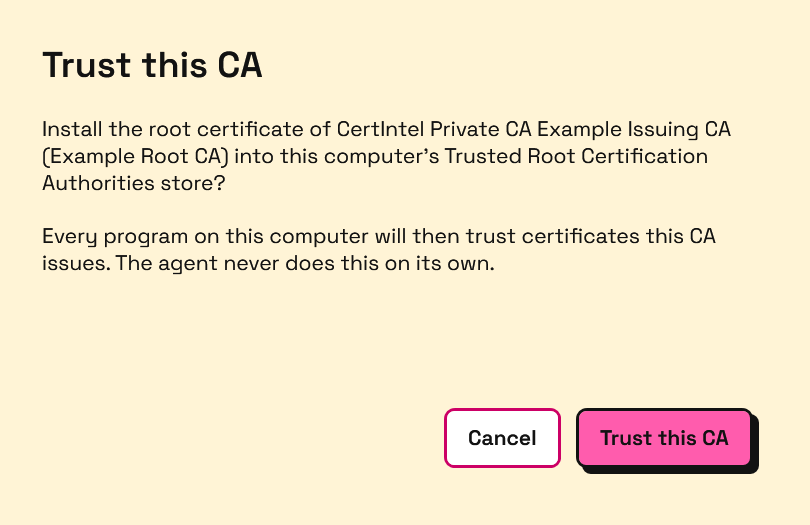
The Windows confirmation. Choosing Trust this CA is followed by the elevated CertIntel Agent - administrator approval box that names the root being installed.
Both are a single-machine convenience, opted into on that machine, not a rollout mechanism: the dashboard cannot trigger them. For a subordinate CA your own root is usually already trusted; the dialog says so. For a standalone CA, roll the root out to the fleet with Group Policy, Intune or your MDM as described in Distributing a Standalone root CA; the CA page's Roll the root out to a fleet fold-out (platform builds after 2026.10.28) links to that guide and keeps this Agent path, one-sentence Group Policy and Intune summaries and the verification commands next to the root download.
Trust status on hosts
Agent 1.5.0 and later report, with their heartbeat, whether the machine
trusts the root of each Private CA they may use, however the root got there
(Group Policy, Intune, a package or certintel private-ca trust). The check
only reads, and needs no root or administrator rights:
| Store | Label in the dashboard | What is read |
|---|---|---|
windows-root |
Windows LocalMachine Root | LocalMachine\Root, read-only, including the purposes the root is restricted to |
debian |
Debian / Ubuntu CA bundle | /etc/ssl/certs/ca-certificates.crt |
rhel |
RHEL / Fedora CA bundle | /etc/pki/ca-trust/extracted/pem/tls-ca-bundle.pem |
suse |
SUSE CA bundle | /var/lib/ca-certificates/ca-bundle.pem |
arch |
Arch CA bundle | /etc/ca-certificates/extracted/tls-ca-bundle.pem |
The report is sent when it changes and at least once a day. It appears:
- on the device, in
certintel status --json(private_ca.trust), in the terminal interface's certificate list (root trust: …) and in the desktop app's workflow view (Root trust on this computer); - on the host's page in CertIntel, under Private CA roots (CA, store, trust and when it was checked);
- on the CA's page, in the Trust on hosts matrix: one row per host and store, reading Trusted, Trusted (server only), Trusted (client only), Not trusted or Error (a store that could not be read). Not reported (needs Agent 1.5.0) lists the hosts that may request certificates from the CA but sent no report; hosts that are not allowed to request certificates are not listed;
- in the API,
GET /api/v1/private-cas/{id}/trust(private_ca.read): one entry per host and store withtrusted,purposes,errorandchecked_at, plusnot_reported.
The report says nothing about other machines: a browser or application on a computer without an Agent is not covered.
Commands
certintel private-ca list # availability and the CAs this agent may use
certintel private-ca refresh # probe availability now
certintel private-ca trust CA-ID # install the CA root into the machine trust store
# (Agent 1.5.0+: TLS server and client authentication;
# run again after upgrading to update an installed root)
certintel private-ca accept-rotation CERTIFICATE-ID
# Agent 1.5.0+: move a certificate to its retiring CA's
# successor when that has a different root
certintel certificates issue ID # issuer-agnostic Issue / replace
certintel certificates renew ID # due-date check (renews when due)
certintel certificates force-renew ID # renew early
certintel certificates revoke ID # ACME only; refused for Private CA certificates
certintel status --json # private_ca: status, detail, checked_at, next_probe, cas;
# approval_pending (Agent 1.3.93 and later)
certintel workflows create --template iis-standard --certificate-id web01 \
--domains intranet.corp.example --issuer private-ca --ca "Example Issuing CA" \
--set site="Default Web Site" --set host=intranet.corp.example --issue
# Agent 1.3.93 and later: certificate + workflow in one step
# Agent 1.5.0 and later add --private-ca-profile server|client|both
# and --ip-addresses (alias --ip); --domains is then optional
The ACME-specific certintel acme issue|renew|force-renew|revoke ID commands
keep working; both forms queue the same service jobs.
Not provided
- OCSP - every certificate carries a CRL distribution point instead.
- A tenant-wide CA - a CA always belongs to one organization. To share a code-signing identity, issue it from the operating organization's CA and register that CA's root as a trusted CA for the other organizations.
- Rotating the root - issuing CAs are rotated under the same root, but a new root means creating a new CA, distributing its root and moving issuance to it; see rotation: a new root.
- Revocation from an Agent key - revoke on the dashboard.
Related pages
- Certificates - the inventory every issued certificate joins
- Distributing a Standalone root CA - Group Policy, Intune, Linux and macOS rollout of a standalone root
- Trusted CAs & ignore list - the trust anchor a CA registers
- CRL distribution point monitoring
- API keys
- Certificate workflows & deployment
- Dashboard-assigned workflows - a Private CA as the issuer of a workflow proposed from the dashboard