Linux Agent - install and setup
CertIntel also publishes a Linux build of the Agent: a static service/CLI binary for amd64 and arm64. It covers the same certificate lifecycle work as the Windows Agent - TLS monitoring, filesystem certificate monitoring, and ACME workflows with the embedded client - minus the pieces that only make sense on Windows (the desktop app, Windows certificate stores, IIS/Windows service integration). Day-to-day management uses the CLI or the full-screen terminal interface.
Requirements
- A systemd-based Linux distribution, x86_64/amd64 or aarch64/arm64.
- Root access for installation and for every CLI command (the service's
control socket admits only root and the service account, so prefix commands
with
sudo). curl,sed,awk,sha256sum,systemctland a few other standard tools. The installer lists anything missing and offers to install it withapt,dnf,yumorzypper.- Outbound HTTPS to your CertIntel API and the selected ACME certificate authority, and to the management interface of any appliance a workflow deploys to (Agent 1.5.0 and later). No inbound port is needed: ACME names are validated with Delegated DNS-01 (HTTP-01 was removed in Agent 1.5.0).
The service runs as a dedicated, locked, unprivileged certintel-agent user
under a hardened systemd unit. Default locations:
| Item | Path |
|---|---|
| CLI/service binary | /usr/bin/certintel (agents 1.3.69 and later; earlier releases installed /usr/bin/certintel-agent) |
| systemd unit (installer script) | /etc/systemd/system/certintel-agent.service |
| systemd unit (deb/rpm package) | /usr/lib/systemd/system/certintel-agent.service |
| private state (config, credentials, ACME state, certificates) | /var/lib/certintel-agent |
| control socket | /run/certintel-agent/control.sock |
The command is certintel; the service, its account, unit, state directory
and socket keep the certintel-agent name so existing installations, release
assets and the bootstrap keep working. Upgrading from a release before 1.3.69
installs the new binary and removes /usr/bin/certintel-agent; update any
scripts or timers that call the old name.
The installer creates the certintel-agent account itself and refuses to
proceed if an account with that name already exists but does not match
(for example a different home directory, a login shell, or an unlocked
password). Remove or correct such an account first.
Install
On the dashboard's Install Tokens page, click Install on Linux on your
organization's token row (platform builds after 2026.10.28; earlier builds
have only Show, which opens the same page). The token page opens at its
Install on Linux (systemd) section with the generated command; the list
itself shows only the token's prefix. For a single machine installed by
hand, mint a one-time install token there or on the Agents page instead
(platform builds after 2026.10.28): shown once with the same command,
consumed by that one enrollment, expiring on its own; see
Install tokens & enrollment.
The command downloads the
CertIntel bootstrap from https://certin.tel/install.sh, which reads the
release record from two independent sources (assets.certin.tel and
api.certin.tel), refuses to continue if they disagree or have expired,
downloads the versioned install-linux.sh, checks its SHA-256, and runs it:
Options chosen on the token page are appended after -s --:
| Option | Flag | Environment variable |
|---|---|---|
| Silent | --non-interactive |
CI_NONINTERACTIVE=1 |
| Reset existing data | --reset-existing-data |
CI_RESET_EXISTING_DATA=1 |
API base (only when not https://api.certin.tel) |
--api-base https://... |
CI_API_BASE |
| Reconnect with an existing agent key instead of enrolling | --api-key cik_... |
CI_API_KEY |
Run interactively with no credential and the installer prompts
CertIntel install token (cit_) or API key (cik_): without echo; it accepts
either. Never pass a token on the command line in shared systems; the
environment-variable form keeps it out of the process list. The installer
unsets the variables as soon as it reads them.
The versioned installer then:
- verifies the binary for your architecture against the release record (URL, exact size, SHA-256) and checks that the downloaded binary reports the expected version;
- creates the service account and writes the hardened unit;
- enables and starts the service and waits for it to become active;
- enrolls (install token) or registers (agent key) the device.
A failure prints CertIntel Agent installation failed during "<step>": ....
--non-interactive is also needed when there is no terminal and
dependencies must be installed; otherwise the script stops with Re-run from a
terminal or set CI_NONINTERACTIVE=1 to approve required dependencies.
Reset existing data disables the service, removes the package (if
installed from deb/rpm), binary, unit, state directory and service user, and
then installs fresh. Interactive runs ask you to type REMOVE. Before the
cleanup the bootstrap starts the service and runs certintel unregister (or
the pre-1.3.69 certintel-agent unregister) so the platform retires the old
device key; if that request is not confirmed it prints a warning and
continues, in which case disable or delete the old key on the Agents page
yourself.
Linux release binaries are authenticated by the signed release records and hashes; they do not carry an X.509 code signature. See the download trust notes.
The installer stages the downloaded binary under
/var/lib/certintel-agent-installer (root-owned, mode 0700, removed on
exit; Agent 1.3.76+) rather than /run, which many distributions mount
noexec. A binary that cannot be executed from there is reported with the
path and the likely noexec cause.
Upgrade
Re-run the same install command on a connected host. The installer detects
the saved credential, replaces only the binary and unit, restarts the service
and prints Existing CertIntel connection retained. Configuration,
credentials, ACME state and certificates in /var/lib/certintel-agent are
untouched. Or use the built-in update commands.
Removing the Agent
There is no uninstall script. Stop and disable the unit, then remove the
binary, unit, /var/lib/certintel-agent, /run/certintel-agent and the
service user yourself. --reset-existing-data always reinstalls after the
cleanup, and cancelling at its REMOVE prompt removes nothing, so it is not a
way to uninstall. Removing the deb/rpm package deliberately keeps
the service user, credentials and certificates in /var/lib/certintel-agent.
Revoke the device's key on the CertIntel Agents page when retiring it.
After installation
After install-token enrollment, reporting stays rejected until an
administrator approves the new device on the CertIntel Agents page - see
Install tokens & enrollment. diagnostics shows the
pending-approval response until then. Once approved, the service sends a
short heartbeat (computer name, version, OS and architecture) at start and
about hourly (Agent 1.3.93 and later: also the moment it notices the
approval, then about every minute for 15 minutes), so the device shows as
online on the Agents page even before it has monitors or certificate
work to report.
To connect later or replace a credential:
sudo certintel enroll --api-base https://api.certin.tel     # install token
sudo certintel register --api-base https://api.certin.tel   # agent API key
sudo certintel unregister
Both prompt without echo; add --stdin to pass the secret from a protected
automation source. Secrets are never accepted as command-line arguments.
Terminal interface (certintel tui)
The terminal interface is the Linux counterpart of the Windows desktop app.
It talks only to the local service, fits an 80x24 terminal, needs no mouse,
and auto-refreshes every five seconds (press p to pause, r to refresh).
Six screens (seven in Agent 1.3.95 and later) are reachable with 1–6
(7) or the arrow keys; ? shows the help
for the current screen; q quits; esc closes a dialog. Every destructive
action asks y/n first. The same action uses the same key on every screen
that offers it: a add, e edit, d delete, space enable/disable, s set
a secret or password, S scan now, t test, R run again, enter open, and
E/K/X connect with an install token or API key and disconnect.
| Screen | What you can do |
|---|---|
| 1 Overview | Connection state, version, schedules, update state, the configuration lock (Agent 1.4.0 and later; a banner while it is on). t Test connection, S Scan and Report, E connect with an install token, K connect with an API key, X disconnect, u check for updates. |
| 2 Workflows | Certificates with phase, expiry, auto-renew and next renewal. a new certificate (guided wizard, Agent 1.3.77+; N before Agent 1.3.88), T new workflow from a bundled template (Agent 1.5.0+), D detect servers and pre-fill a new certificate (Agent 1.5.0+, see Server detection), e edit the certificate, w edit (or convert) its workflow, c toggle the subject common name preference, enter details, S post-renewal scripts, i Issue / replace, n scheduled renewal check, f Renew now, v Revoke (ACME only), R Install again, space toggle Auto-renew, d delete the certificate lifecycle. tab switches to the workflow definitions pane: enter steps and last run, e edit, s set a workflow secret, V validate, P preflight, W set the workflow's deployment window (Agent 1.4.0 and later), d remove an unused workflow. The certificate detail shows the next renewal with its basis (ARI or lifetime), the CA's renewal window and next check, and a renewed certificate waiting for a deployment window. |
| 3 Agent Monitors | Panes for TLS probes, certificate files, CRL distribution points (Agent 1.3.73+, see CRL monitoring) and the discovered inventory: tab switches pane, a add, e edit, d delete, space enable/disable, s set the keystore password of a PFX/P12/JKS monitor. m toggles Check internal endpoints assigned by CertIntel, c toggles the post-install re-check, R runs the managed check now, S scans now. |
| 4 Activity | Latest 500 entries or retained history (h), o older page, d include debug entries, / search, l cycle level filter, enter details, x export visible rows to a file. |
| 5 Settings | Reporting organization, scan/managed/renewal/update intervals, log retention, update checks, post-install re-check, renewal windows, DNS delegations (add, test, replace secret), ACME accounts and EAB secrets, connect/disconnect, (Agent 1.4.0 and later) the Configuration lock, the Agent default deployment window and Report failed step output, and (Agent 1.5.0 and later) Platform credentials (appliances) - see Remote & appliance deployment: enter or e edit, space toggle an on/off row, a add, d delete, s set a secret, t test a delegation, E/K/X connect or disconnect. |
| 6 Jobs | Queued and recent operations; enter shows a job's events and errors, f follows it in the status bar. |
| 7 Assignments (Agent 1.3.95 and later) | Certificate workflows proposed for this Agent in the CertIntel dashboard, with the local auto-apply policy. enter details, y approve, n reject with a reason, A toggle auto-apply, R ask the platform now, H include history. Approving, rejecting and the policy need sudo. See dashboard-assigned workflows. |
The same decisions are available without the full-screen view: sudo certintel
assignments list, show ID, approve ID --revision N (the revision show
prints), reject ID --reason TEXT, refresh
and policy --auto-apply on|off (Agent 1.3.95 and later).
Secrets (tokens, API keys, keystore passwords, delegation secrets, EAB keys)
are never typed inside the full-screen view: the form collects the other
fields, then the terminal is released and the same hidden prompt as
secret set reads the value.
Creating a certificate in the terminal interface
Since Agent 1.3.77, a on the Workflows screen (N before Agent 1.3.88) opens a wizard that covers the
certificate names, the issuer (an existing or new ACME account, with EAB when
the CA needs it, or CertIntel Private CA when the platform offers it to
this Agent - see Private CA;
Agent 1.3.93 and later list it as a disabled CertIntel Private CA – not
allowed for this agent / – awaiting approval / – no active issuing CA
yet / – availability unknown entry, with the advice in the help line,
until it can be used),
DNS delegations (added inline), where the certificate
is saved and the scripts that run after each renewal, then shows a review
before anything changes. Guided types replace the Windows template catalog:
save files (PEM, CRT + KEY, PFX, P12, DER, P7B or JKS), NGINX, Apache httpd
and Tomcat, and (Agent 1.5.0 and later) HAProxy, Caddy, Traefik, LiteSpeed,
Postfix, Dovecot, PostgreSQL and MySQL, which install the files through a
root starter hook (see Linux service targets). ctrl+g
on the deployment page fills it in from the server configuration found on
this host (Server detection, Agent 1.5.0 and later).
A Private CA certificate can choose a Certificate profile (TLS server,
client, or both) and may name only IP addresses (Agent 1.5.0 and later; see
Private CA). Output names are
checked as you type (letters, digits, ., - and _, no extension and no
Windows device name such as CON; Agent 1.4.0 and earlier: lowercase letters,
digits, - and _ only) with a suggested name. The Overview screen lists the setup
steps that remain.
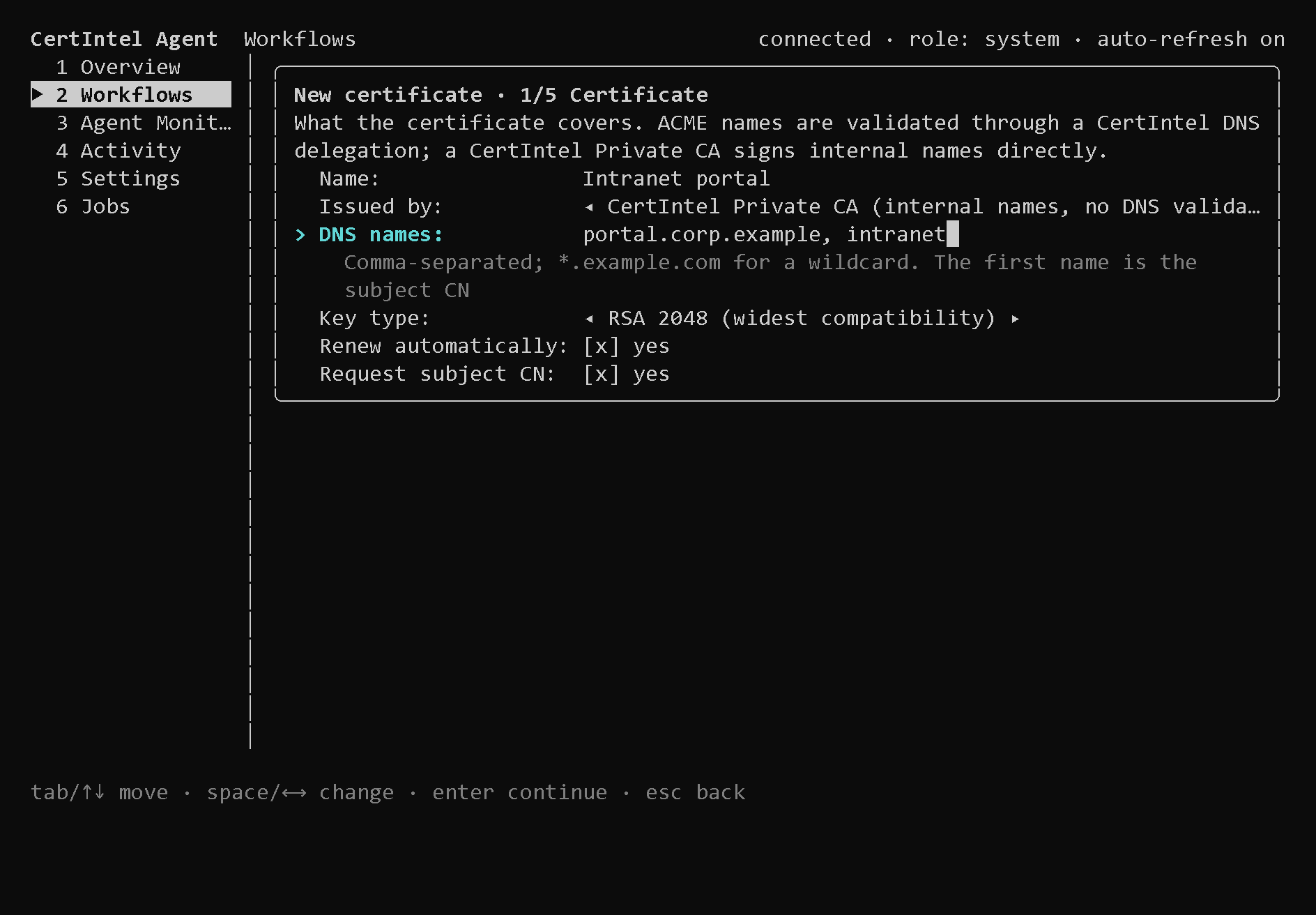
The Certificate page. Issued by is shown only when the platform offers a
Private CA to this Agent; with no ACME account yet the wizard starts on the
Private CA. Request subject CN is the omit_common_name setting.
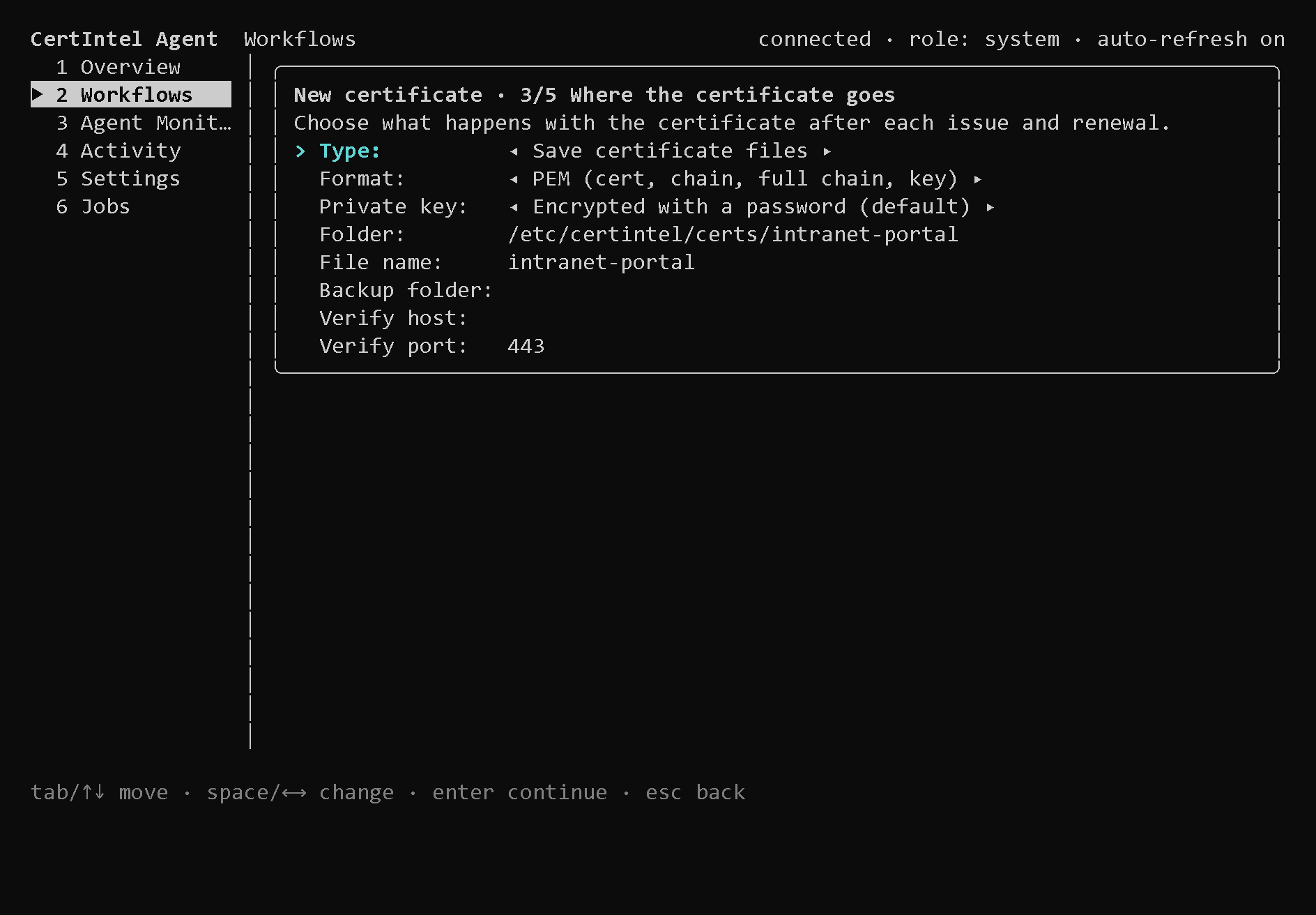
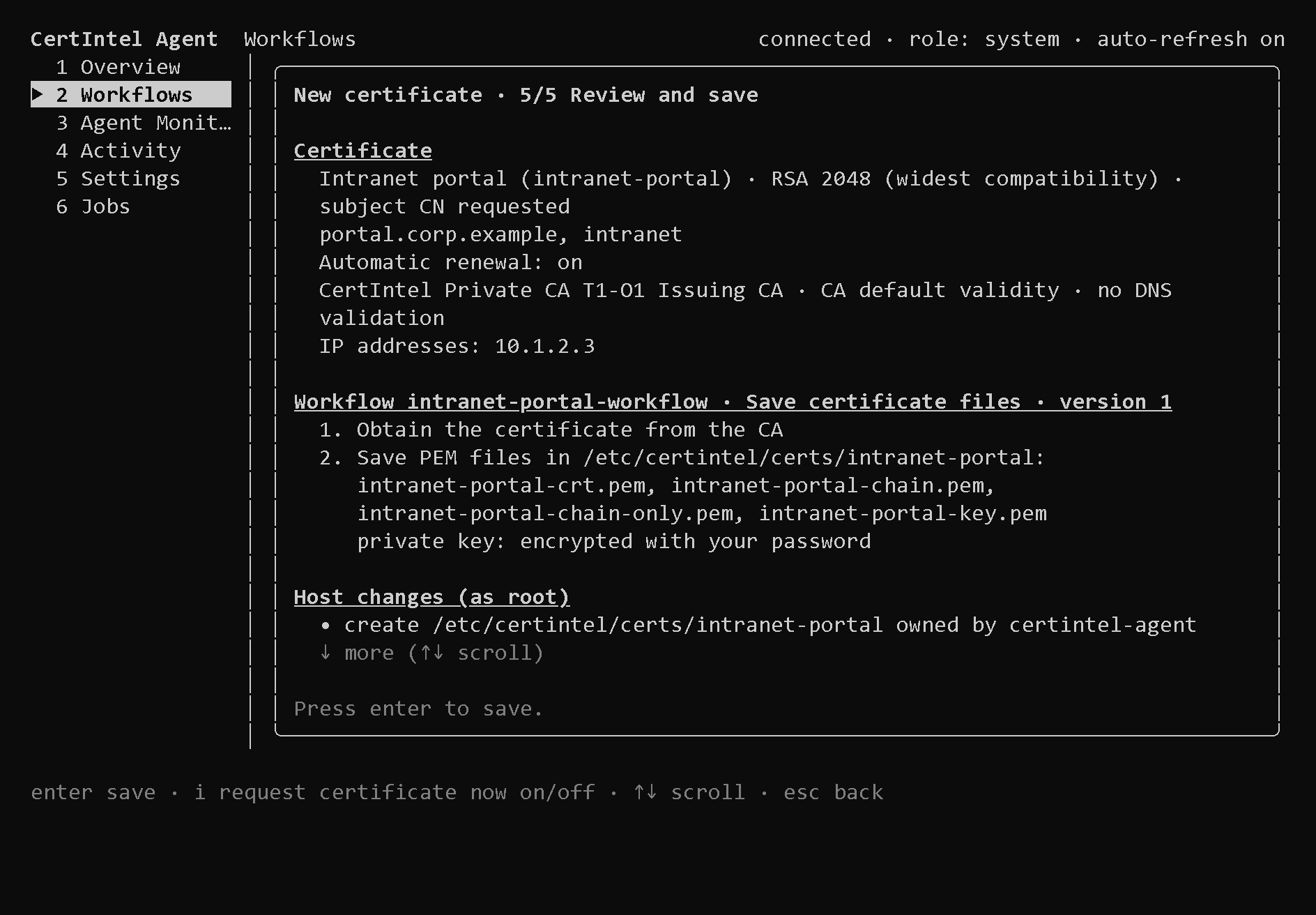
Nothing is saved or created until you press enter on the review page.
When you choose a destination folder, the terminal interface prepares it as
root: it creates the folder for the certintel-agent account (mode 0750),
allows it in the systemd drop-in
/etc/systemd/system/certintel-agent.service.d/50-certintel-tui-paths.conf
(ReadWritePaths) and restarts the service. System, home, temporary and other
software's configuration folders are refused.
Agent 1.4.x host setup could also allow an HTTP-01 challenge folder and the
port-80 capability (CAP_NET_BIND_SERVICE) in that drop-in. HTTP-01 was
removed in Agent 1.5.0; the next host setup rewrites the drop-in without them
(see HTTP-01 was removed).
Workflows from bundled templates
Since Agent 1.5.0, T on the Workflows screen opens New workflow from a
template, which lists every bundled template that runs on this system - for
example the appliance templates, which deploy to a
management API over HTTPS - and creates the certificate and the workflow from
it in one form: Certificate ID, DNS names (each needs a CertIntel DNS
delegation), ACME account and the template's own fields. A field marked
(this computer only) cannot be set by a dashboard assignment. A credential
field is either Local: set on this computer (the hidden prompt asks for it
after saving, as username:password or the API token) or a CertIntel platform
credential, which only a workflow created by a dashboard assignment can use.
A workflow created from a bundled template - by T, by a dashboard
assignment or by certintel workflows create - is no longer rewritten by w
or e (Agent 1.5.0 and later). They open Edit fields instead: This
workflow comes from the bundled template … Only its fields are edited here;
its steps stay as they are. A workflow that names no bundled template and was
not created with the terminal editor opens read-only; change it with the
desktop app or certintel config. Agent 1.4.x and earlier rewrote such a
workflow's steps from the guided types.
You can still build the workflow JSON elsewhere and apply it with
config apply --file. Deployment plans, Windows stores, AD CS templates and
themes are not applicable on Linux.
Post-renewal scripts (hooks)
The service runs unprivileged and cannot reload a web server or copy a file into a root-owned directory by itself. Since Agent 1.3.77 a separate root hook runner does that on its behalf, within a narrow boundary:
- The installers create
/etc/certintel/hooks.d(root-owned,0755) and enablecertintel-agent-hooks.socket, a systemd socket at/run/certintel-agent-hooks.sockthat startscertintel hooks serveas root on demand. - A workflow's
hook.runstep names a script in that directory. The runner executes only root-owned files there, so the Agent can request a script that root installed and nobody else can change, and nothing else. - The script receives the certificate details as
CERTINTEL_*environment variables (names, thumbprints, serial, validity, output directory, format and oneCERTINTEL_<ROLE>_FILEper file) together with verified private copies of the files the save step wrote. Its output goes tojournalctl -t certintel-agent-hooks; the step records the exit code and the tail of the output. When the script fails, Agent 1.4.0 and later send the redacted end of that output to CertIntel with the failure report; see Reporting failed step output. Son the Workflows screen creates scripts from templates (custom, NGINX reload, Apache reload, Tomcat keystore install and restart, and in Agent 1.5.0 and later the service starter hookscertintel-<kind>.sh) and opens them in$EDITOR.certintel hooks listshows which scripts the runner accepts;certintel hooks starter KIND [--write]prints or (as root) writes a service starter hook.
The inputs and outputs of hook.run are listed in
Modular workflows.
Configuration lock
Agent 1.4.0 and later have a configuration lock: a root-owned file that, while it exists, makes the Agent refuse configuration changes proposed by the CertIntel platform. The only such changes are dashboard-assigned workflows; the platform cannot push scripts, hooks or other configuration to an Agent at all.
sudo certintel lock --reason "Change freeze until 2026-11-15"
sudo certintel lock status
sudo certintel unlock
The commands need root and exit with 2 without it (1 on another error).
Without root, certintel status --json shows the state as config_lock
(locked, since, by, reason, error). In the terminal interface,
started with sudo, the Configuration lock row on the Settings screen
turns it on (with an optional one-line reason) or off with enter; the
Overview shows a row for it and, while it is on, a banner.
While the lock is on:
- dashboard assignments are not applied: auto-apply is skipped,
yon the Assignments screen andcertintel assignments approveare refused (codelocked), and each waiting assignment is reported once per revision as awaiting approval with the reason Configuration lock is on; platform changes are blocked on this agent. Proposals that arrive during the lock wait for an administrator after it is turned off and are never auto-applied; - renewals, installations, monitors, reporting, local changes in the terminal
interface or with
config apply, and updates continue.
The file is /etc/certintel/config.lock, owned by root:root with mode
0644, in the root-owned /etc/certintel directory, and holds
{"schema":1,"locked_at":"…","locked_by":"…","reason":"…"}. The service runs
as the unprivileged certintel-agent account under ProtectSystem=strict,
so it cannot create or remove the file. It reads it at most once a minute and
tells CertIntel within about 30 seconds after noticing a change; the
dashboard then shows the Agent as Locked. A file that is damaged or
cannot be read counts as locked, with the error shown, so a broken lock
never silently opens up. Anyone with root on the machine can remove the lock;
it protects against the platform, not against local administrators.
Updates
Install updates from the CLI:
update check compares the installed version with the signed release record
and prints either Installed X is current (latest verified release Y) or
Installed X; verified release Y
is available. Run: sudo certintel update install. update install
downloads the release's pinned install-linux.sh, checks its SHA-256 against
the signed record, and runs it non-interactively; the existing connection is
kept. Schedule it with cron or a systemd timer if you want unattended
upgrades. Older versions are never offered; a problem release is always fixed
by a newer one.
Update checks (Agent 1.5.0 and later)
The service itself checks for verified updates, by default every 24 hours
(the updates settings: Check for agent updates, Update check
interval, 1-720 hours, on the terminal interface's Settings screen). It
verifies the signed release record for its architecture and shows the result
on the Overview screen: Update state reads update available: X when a
newer verified release exists, and Update policy shows check only,
checks disabled or auto-install enabled with the last and next check.
certintel status --json reports the same under update. Checking never
installs anything.
Automatic installation on Linux is not available in this release. The
Install verified updates automatically setting is shown, but the terminal
interface explains that automatic installation on Linux is not available in
this release and that you install updates with sudo certintel update
install. Agent 1.5.0 already ships the mechanism it is built on, which stays
unused until automatic installation is offered: a root helper
(certintel-agent-update.socket, starting [email protected])
that verifies the signed release itself, never installs an older version,
restarts the service and restores the previous binary when the new one is not
running healthily within a minute. An Agent installed from a deb or rpm
package updates through apt or dnf, never through the helper.
Update requests from the dashboard
Update now and Update all outdated in CertIntel (Agent 1.5.0 and
later; see Windows Agent updates) reach a Linux
Agent with its next heartbeat. Because automatic installation is not
available on Linux in this release, the Agent refuses the request and the
dashboard shows Update refused - with automatic installation is off on the
device while the local setting is off (the default), otherwise automatic
installation is not available in this release. Install the update on the
machine with sudo certintel update install. The configuration lock does not
block signed updates.
What's different from Windows
Linux does not run the WPF desktop app or the Windows-specific deployment
helpers - no IIS integration, no Windows certificate stores, no Windows
service restart action and no Microsoft service templates.
Supported Linux actions include TLS endpoint and file
monitoring, ACME issuance, certificate exports, local file/process actions,
systemd service actions, root post-renewal scripts
including the service starter hooks, and (Agent 1.5.0 and
later) deployment to appliances over their management
API. Server detection runs only in the root terminal
interface. Use the terminal interface or the CLI's
versioned configuration transaction (config get --json, validate --file,
config apply --file) for configuration; action platform constraints still
apply. Windows store verification/cleanup and AD CS store scans are
Windows-only.
Because the service runs as an unprivileged user, the destination directories
for exported certificates must be writable by certintel-agent (the terminal
interface prepares them for you), systemd service actions work only for units
that account may control, and anything that needs root goes through a
post-renewal script. Trusting a CertIntel
Private CA root on the machine is likewise an explicit root step:
sudo certintel private-ca trust CA-ID writes the anchor into the
distribution's CA bundle and runs its update command. Agent 1.5.0 and later
read the Debian, RHEL, SUSE and Arch bundles without root and report whether
each Private CA root is trusted, in certintel status, the terminal interface
and the CertIntel dashboard (see
Private CA).
Local secret protection and release trust
Linux secrets rely on restrictive filesystem ownership and permissions (the
state directory is mode 0700); there is no DPAPI equivalent. Protect service
state, backups and exported private keys, and grant the service account only
the paths and restart permissions required by its configured workflows.
Linux artifacts are bound to signed release metadata and hashes, but currently lack an X.509 certificate-backed binary signature. The Windows Authenticode guarantee does not apply to ELF binaries or deb/rpm packages. See the download trust notes.