CertIntel Agent workflow usage
Use a modular workflow to export an issued certificate, update an application, and verify the certificate it serves. This guide covers the Windows Workflow studio, including the workflow editing and Windows store verification features in Agent 1.3.70 and later, and the same workflow definitions on Linux. See certificate workflows and deployment for certificate policy setup and the action reference for all inputs.
Screenshots follow your wiki theme and light/dark mode. Click any screenshot to enlarge it; use Actual size for fine details and Escape to close.
Templates, workflows, and steps
On Windows, open Workflows → + New certificate workflow. Choose a bundled template, Start from scratch, or Import workflow…. Bundled templates are immutable starting points; your copy is a user-owned workflow with its own variables, secrets, and steps. Templates are compiled into the Agent and come with its signed release; there are no template packages to download. Custom step sequences remain yours; the Agent can upgrade a recognized, unchanged store/IIS template sequence as described under Windows store verification.
For an existing certificate, select its row and Edit workflow… → Edit workflow settings and steps…. Account, DNS delegation, protected secrets, preflight, and application steps are grouped in that certificate's management dialog.
Workflow definitions live on the Agent host and are created and edited there,
with the desktop app, the Linux terminal interface or certintel workflows
create. The CertIntel dashboard shows their results (check-ins, renewals and
job outcomes). With Agent 1.3.95 and later a dashboard administrator can also
propose a workflow for one Agent from a bundled template; the Agent
validates it like a local workflows create and a local administrator approves
it on the device before anything is created. The dashboard still cannot edit,
push or remove a workflow. See
dashboard-assigned workflows. (An appliance
credential a dashboard assignment names is not a workflow push: it is fetched
only with a local opt-in; see Appliance deployment.)
Create a certificate workflow
- Open Workflows → + New certificate workflow. Search the template library or choose Certificate stores and files, Java and Tomcat keystores, Web servers and services, or (Agent 1.5.0+) Appliances (remote) and Microsoft services (see Appliance deployment and Microsoft services). Detect servers on this computer… (Agent 1.5.0+) pre-fills a template from a server it finds on the machine; see Server detection. Read the step outline and supported platforms.
- Give the workflow a useful name and fill in its destination, service, and other
setup fields. Paths refer to this Agent machine. Use Browse… for folders
or
keytool, and search services by name or display name; selection saves the exact service name. Switching templates preserves entries within the open gallery. Choose Continue with template. - In the studio, adjust Setup, arrange Steps, and check Review. Choose Continue to certificate setup when ready. Supply any declared protected secrets that were not already entered in template setup.
- Complete Names & authority, DNS validation, and Review & create. These configure the certificate policy around your workflow. The side panel shows the selected workflow's step outline. (Agent 1.4.x also offered an HTTP-01 choice with an HTTP validation stage; it was removed in Agent 1.5.0, see HTTP-01 was removed.)
- Review the complete configuration and choose Create & issue to save it and start issuance. Watch the resulting job; export or installation success alone does not establish that the application serves the new certificate.
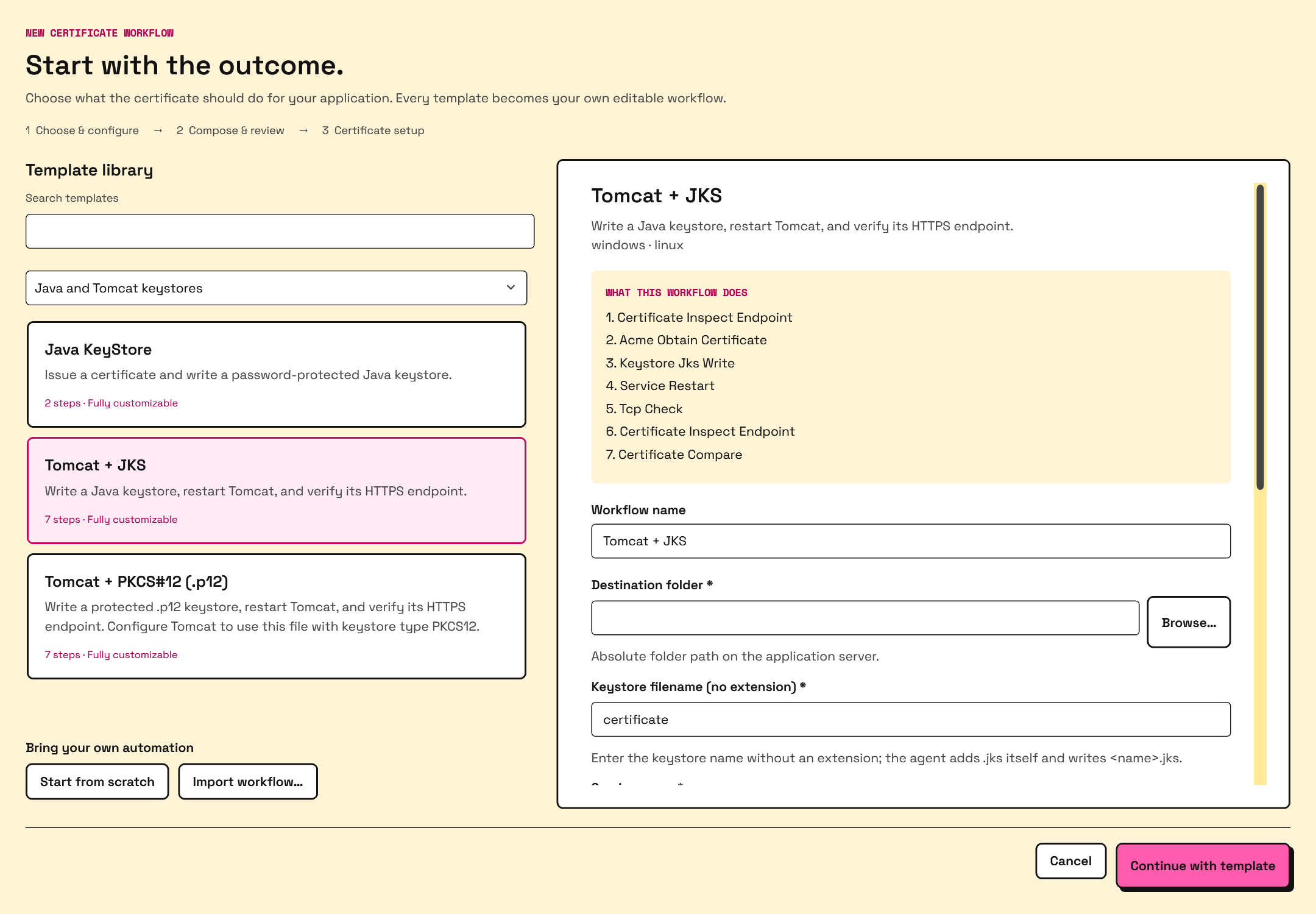
Template library. Screenshots in this guide show the actual Windows UI with example configuration and sample job data.
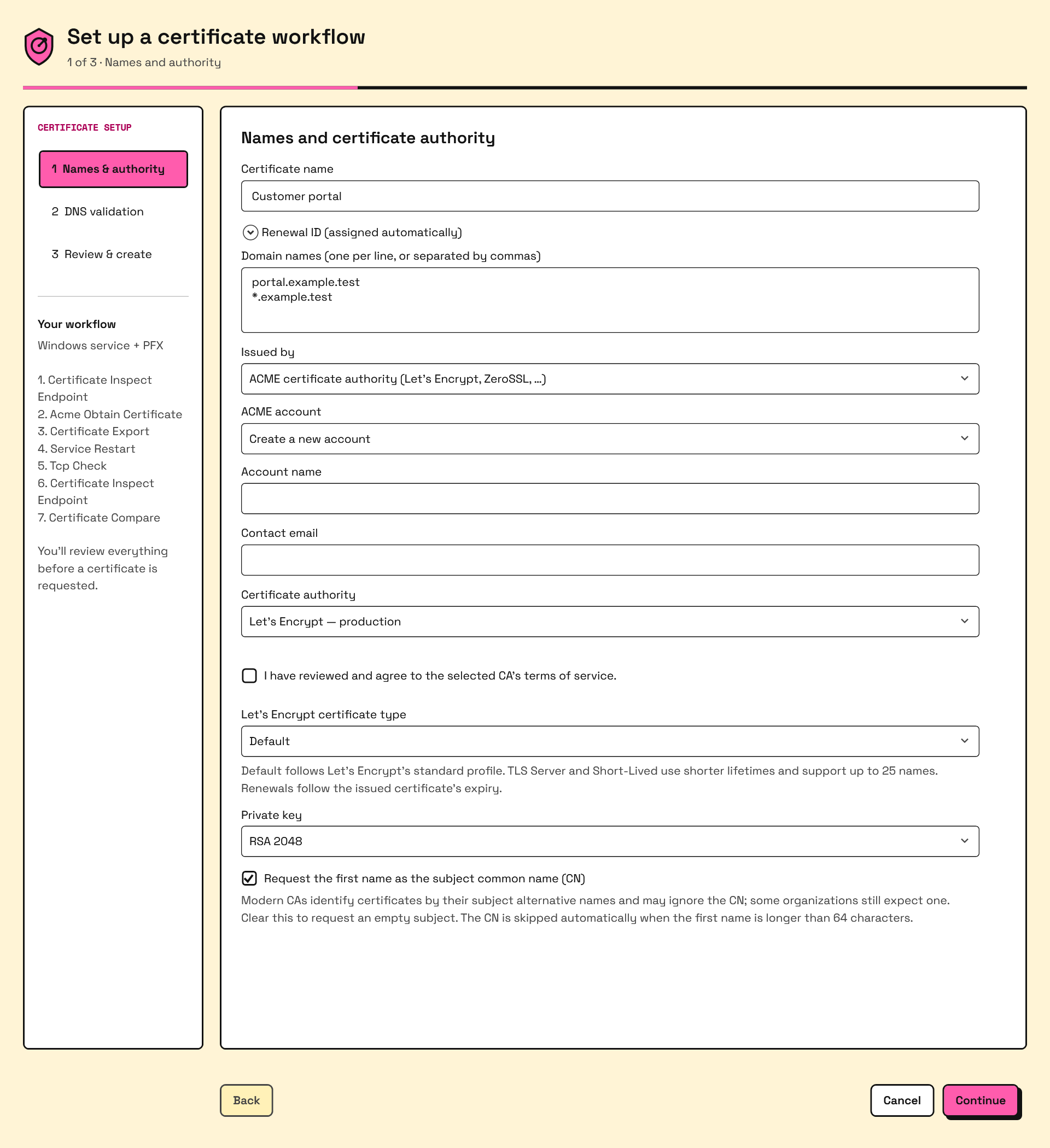
Names & authority with an ACME certificate authority. The Issued by choice appears only when the platform offers a CertIntel Private CA to this Agent.
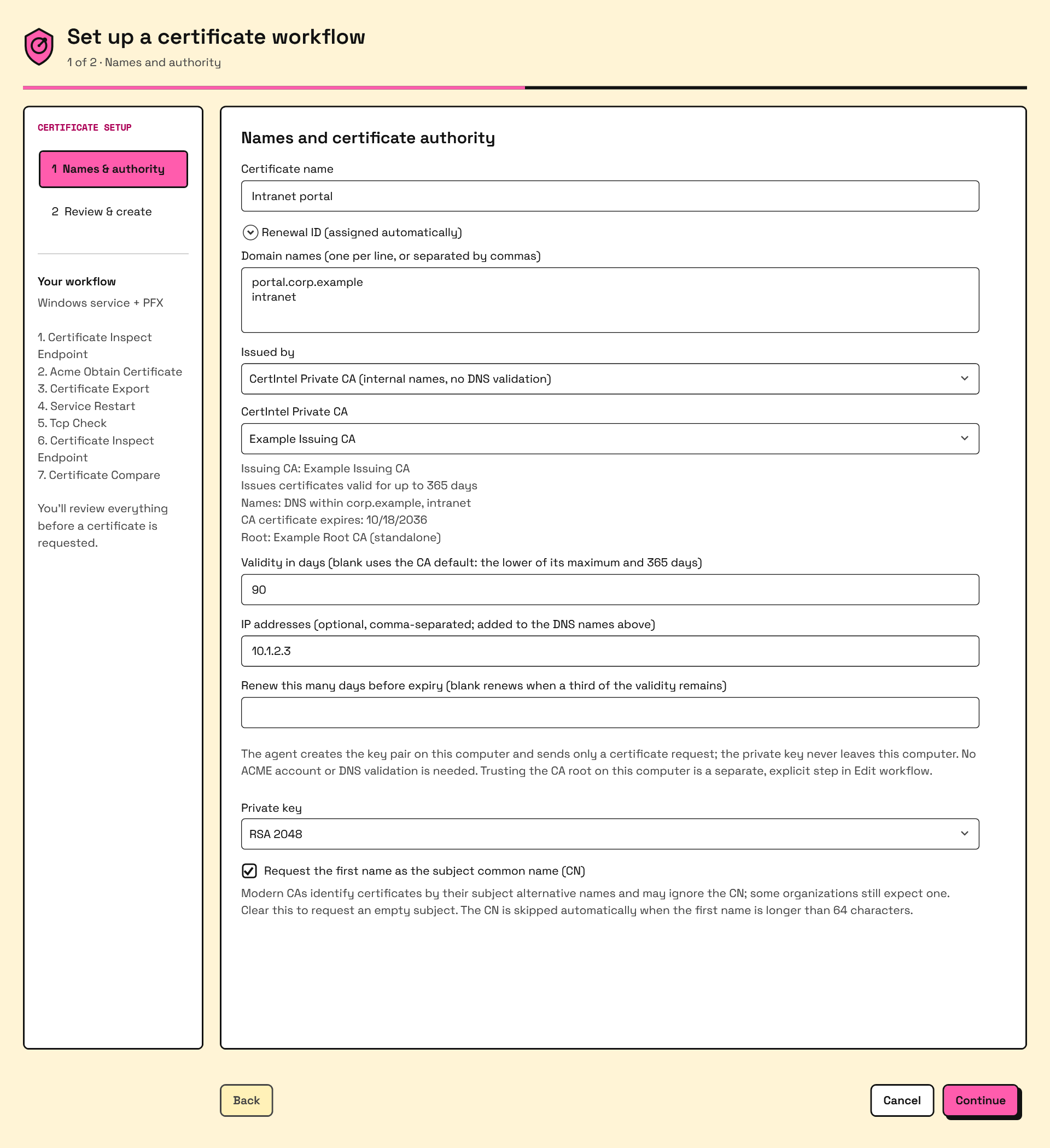
The same stage with CertIntel Private CA (internal names, no DNS validation) selected: the DNS validation stage disappears. See Private CA.
Existing storage/installation plans remain supported. From Edit workflow…, choose Choose modular template… to switch an existing certificate to a workflow. The old plan definitions and installed files are retained; the certificate begins using the selected workflow. See certificate setup for account and issuance details.
Edit in Workflow studio
| Tab | What to do |
|---|---|
| Setup | Edit the name, description, and typed Shared settings. Define a destination or service once and reuse it in multiple steps. |
| Steps | Search/filter the Action library, arrange the numbered Execution sequence, and inspect the selected step's inputs, current shared values, dependencies, and failure handling. |
| Review | Find missing inputs/settings, undeclared secret references, duplicate IDs, unavailable actions, and missing/forward output references. Select a finding to locate the related step, then edit it. Use Validate with agent for the service's definition check. |
| Advanced | Declare protected secret names and inspect workflow identity, platforms, and template provenance. Reference and condition guide opens the reference help. |
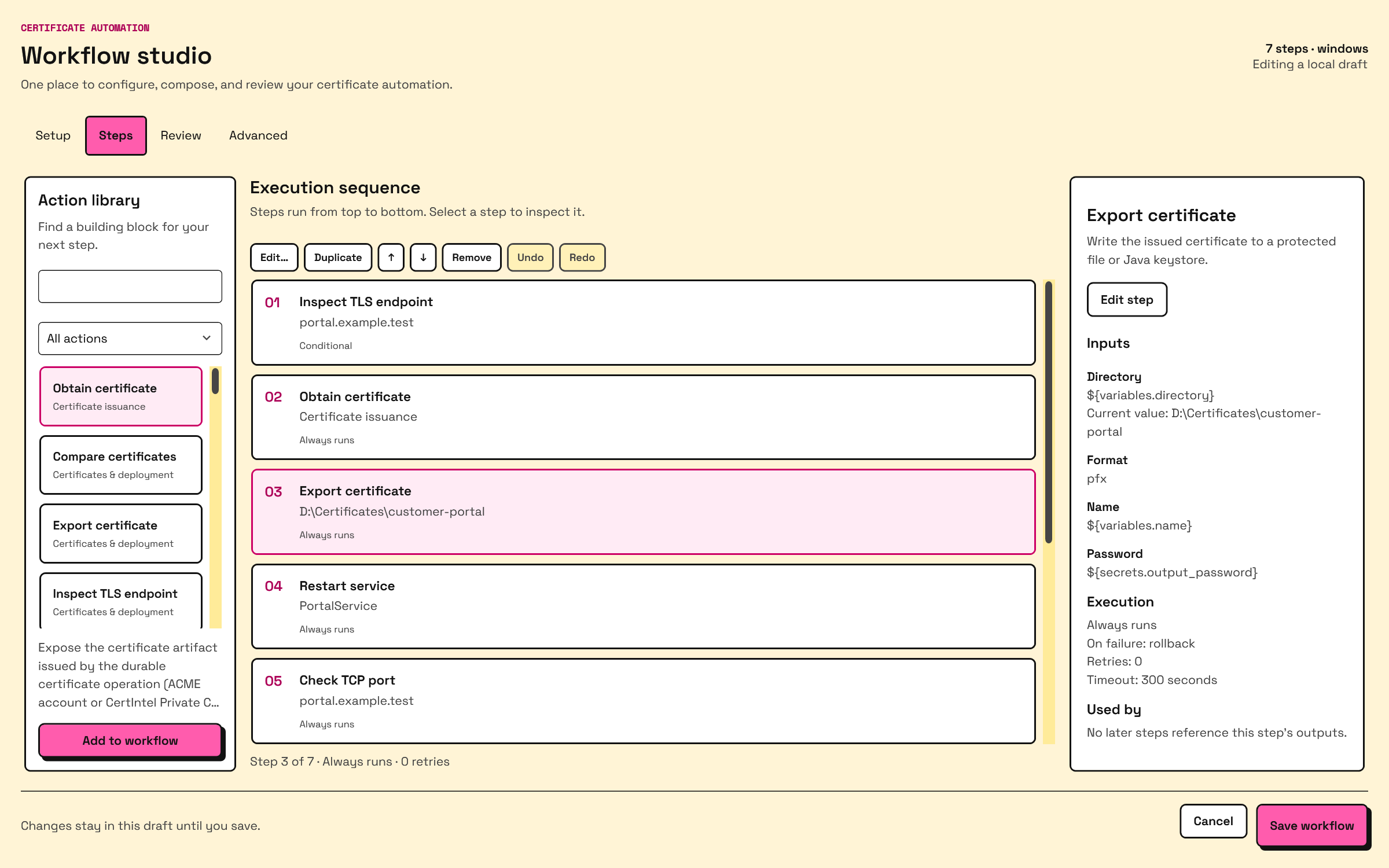
Choose Add to workflow to insert an action after the selected step, or at the end if none is selected. Double-click a step to edit it. Use Duplicate, the up/down controls, or drag and drop to arrange steps. Duplicating creates a new reference ID but retains its inputs and references to earlier steps; it does not redirect later consumers to the duplicate.
Undo and Redo restore step edits during this editing session. They do not undo shared-setting changes or restore previously saved workflow versions. The library, sequence, and inspector scroll independently; on smaller windows the inspector is hidden, and double-clicking a step still opens its editor.
Save workflow validates and saves the draft for the next run. It does not run the workflow. Cancel discards the studio draft. This local save behavior is separate from the main Settings page's automatic saving.
| Shortcut | Action |
|---|---|
Ctrl+F |
Open Steps and focus action search. |
Ctrl+S |
Save, or continue to certificate setup when creating. |
Ctrl+D, Ctrl+Z, Ctrl+Y with the step list focused |
Duplicate, undo, redo. |
Enter / Delete with the step list focused |
Edit / remove the selected step. |
Shared settings and protected secrets
Use Setup → Add a shared setting to add a reference name, value type, and initial value. Types are Text, Number, Yes / no, and JSON. The form retains the JSON type, so a numeric port remains a number and a yes/no setting remains a boolean. Restore removed setting restores the most recently removed setting. Edit variables as JSON (advanced) is available for type changes and structured values; invalid JSON stays editable until corrected.
In a step, Insert value… offers shared settings, declared protected secrets, outputs of earlier steps, date/time values, and common certificate properties. Password inputs offer protected secret references. The picker helps with reference spelling and ordering; you must still choose a value of the input's required type. The namespace reference below includes values that are not listed in the picker.
Declare secret names on Advanced and save the definition. For a saved workflow, open Edit workflow… → Protected secrets… to set or replace values together. Leave an existing secret's field blank to keep it. Declaring a name does not itself create a value, and definition validation does not prove that a secret is already stored.
Review, export, and reuse
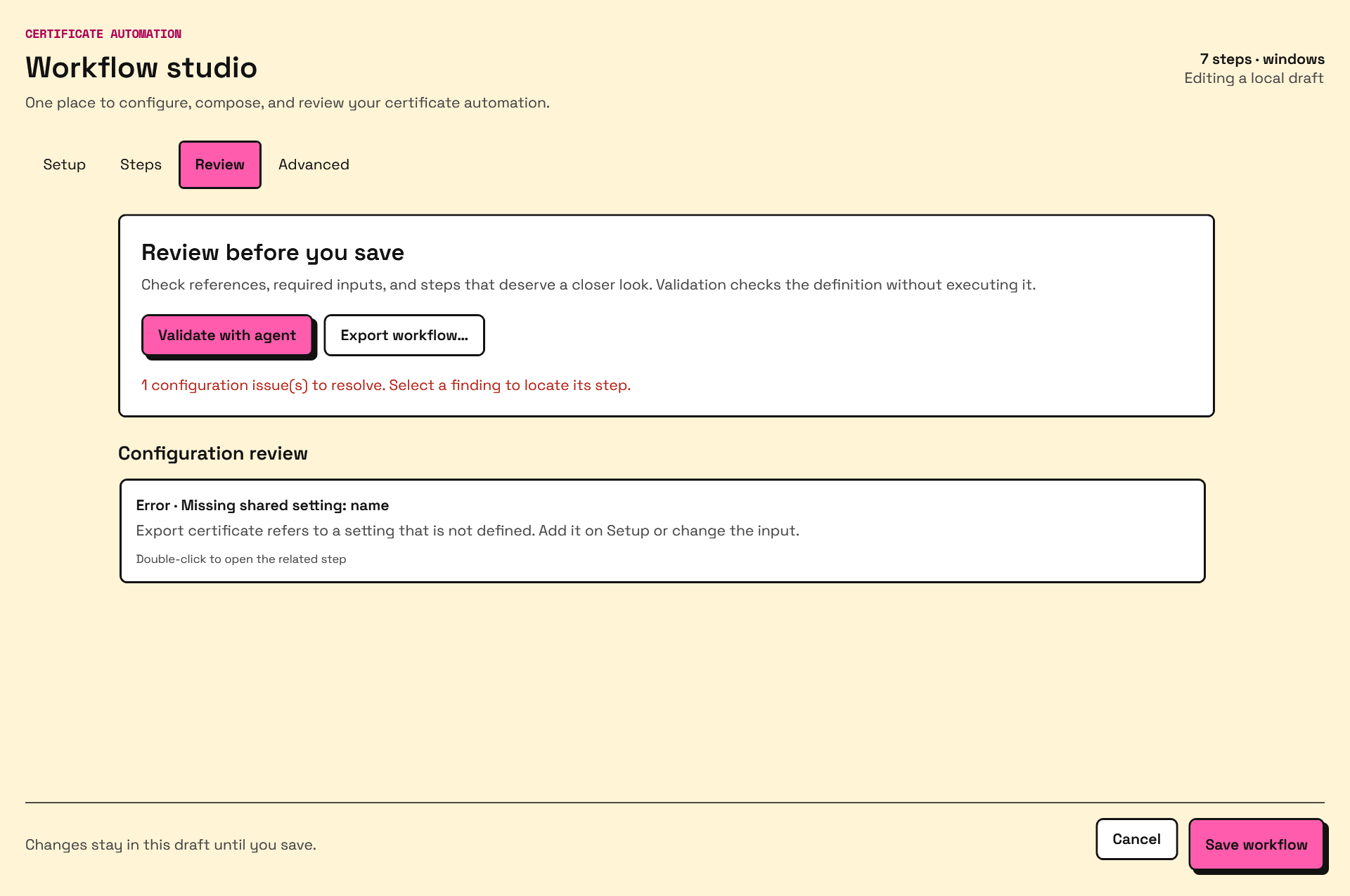
Review also calls attention to local programs, file moves/deletions, and service changes without a health check. Validate with agent checks the unsaved definition without saving it or executing actions. It cannot prove that paths, services, endpoints, or protected secrets will be available at execution time.
Choose Review → Export workflow… for a reusable JSON definition. Import it through + New certificate workflow → Import workflow…. Import creates an independent workflow ID, resets its version, and retains the step IDs so internal references keep working. It does not overwrite the original. The Windows importer accepts schema version 1, 1–128 steps, files up to 1 MiB, and Windows-compatible platform declarations; action validation follows in the studio.
Exports retain shared settings, step inputs, and secret names/references. They do not read protected secret values from the Agent. Set those secrets again on the destination Agent, and review its local paths, services, and platform support. Any sensitive value manually typed as a literal or ordinary variable would still be part of the JSON: use protected secrets before sharing a definition. Importing local JSON does not install a signed or remotely managed template package.
Execution order and step identity
Steps run sequentially, from top to bottom. They do not run in parallel. The
certificate policy still owns names, ACME account, DNS delegations, and renewal
scheduling. ACME issuance completes before modular steps start. The action
acme.obtain_certificate exposes that already-issued certificate to the workflow;
moving it lower in the list does not postpone issuance.
Each step has two identities:
| Field | Purpose |
|---|---|
Label (name in JSON) |
Human-readable description, such as “Inspect updated endpoint”; this is what the UI primarily displays. |
Advanced reference ID (id in JSON) |
Generated, stable identifier used by later inputs and conditions. Expand this section in the step editor to view it. |
Renaming a label does not change its reference ID. Adding the same action again generates a distinct ID. Prefer the condition/output picker wherever offered, especially Previous yes/no result, instead of manually typing references. For fields that require a reference by hand, copy the actual advanced ID and use an output declared by that action. The IDs in the examples below are explicit example IDs, not labels to type into the editor.
Variables and references
References use ${namespace.field} syntax. Names and output spelling must match
the saved definition. These are the currently supported namespaces:
| Namespace | Available values and practical examples |
|---|---|
${variables.name} |
Your workflow's variables object. Set host to app.example.com, port to numeric 8443, then use ${variables.host} and ${variables.port} in endpoint inputs. |
${secrets.name} |
A declared secret_refs name stored separately in the protected secret store. Use ${secrets.output_password} as the complete export password value. |
${steps.<reference-id>.<output-name>} |
A declared output from a completed earlier step, such as ${steps.after.thumbprint} or ${steps.check-directory.exists}. |
${certificate.*} |
Current issued certificate: thumbprint, previousThumbprint (empty on first issuance), subject, issuer, serial, notBefore, notAfter, domains, generation. For example, compare ${certificate.thumbprint} with an endpoint thumbprint, pass ${certificate.domains} as expected SANs, or test exists ${certificate.previousThumbprint} to skip a step on first issuance. These are the issued artifact's facts, not a live endpoint probe. |
${renewal.*} |
Currently ${renewal.id} only: the certificate policy's stable renewal ID. Useful in conditions and comparisons; it cannot be used to build a file name or path (see below). |
${workflow.*} |
id, name, version of this workflow. For example, use backup-${workflow.id} as a directory component. |
${system.*} |
os, arch, date, dateCompact, timestamp, timestampUtc. For example, ${system.os} in a condition, or ${system.dateCompact} as the filename of a file.backup step. |
System dates use UTC and are captured at workflow start: date is YYYY-MM-DD,
dateCompact is YYYYMMDD, timestamp is YYYYMMDD-HHMMSS, and timestampUtc
is RFC 3339. os is windows or linux; arch identifies the Agent build's
architecture. Certificate and renewal values require an issued artifact, so they
may be unavailable during preflight before first issuance.
Where runtime values may be used. Values that are only known while the
workflow runs - ${steps.*}, ${certificate.*}, ${renewal.*} and
${system.*} - can be compared, checked and passed to certificate.compare,
but the validator rejects them wherever they would decide what a step acts on:
every input of a step that changes something (export, keystore write, store
install, IIS binding, file copy/move/delete/backup, process execution, service
actions) and the path, URL, host, port, service, store, site or name inputs of
read-only checks. Use literals or ${variables.*} for those. The only
exceptions are the confirmed and activation_confirmed inputs of the store
cleanup step (fed by a certificate.compare result) and the filename of
file.backup, which may be exactly ${system.dateCompact} or
${system.timestamp}. An input name the action does not declare is also
rejected. The error names the step and input, for example step "export"
input "name" cannot use runtime-derived reference "renewal.id".
Reading a step reference
In ${steps.issue.thumbprint}:
stepsselects results of prior steps in this run.issueis the earlier step's stable reference ID, not its label.thumbprintis an output declared by that step's action.
For an acme.obtain_certificate step with ID issue, this is the issued
certificate's thumbprint. For an endpoint inspection with ID after,
${steps.after.thumbprint} is the certificate the server actually presented.
For directory.exists with ID check-directory,
${steps.check-directory.exists} is a boolean.
Only completed earlier steps can supply action outputs. A future step, the current step, or a previous run cannot supply them. Skipped steps have no action outputs, and a failed step continued by policy does not make its diagnostic outputs available to later references. Guard dependent steps appropriately; an unavailable reference fails resolution. Deleting or reordering a producer can invalidate later references even though renaming its label is safe.
Types and common mistakes
| Type | Correct usage and common mistake |
|---|---|
| String | "app.example.com", or "server-${system.dateCompact}". Embedding a reference in surrounding text produces a string. |
| Boolean | Use the UI yes/no control or JSON true / false, not strings "true" / "false". True/false conditions require actual booleans. |
| Integer | Use JSON 8443, not "8443". A whole-value reference such as "${variables.port}" preserves the referenced numeric type. |
| Array | Use ["--reload"] for process arguments, [0, 2] for allowed exit codes, or "${certificate.domains}" for a SAN array. Comma-separated text is not an array. |
| Object | Use an environment map such as {"MODE":"production","PASSWORD":"${secrets.app_password}"}. Do not stringify the whole object. |
| Date/time | Inspection and certificate expiration outputs can be passed directly to comparison inputs. Literal dates for those inputs must be RFC 3339, such as 2026-09-20T12:00:00Z. |
| Artifact | acme.obtain_certificate declares a certificate artifact output. It is an opaque handle, not certificate bytes, a filename, or a password. Export/install actions consume the Agent's current issued artifact internally. |
A reference occupying the entire JSON string preserves its original type;
interpolating an array or object into larger text does not produce usable JSON.
Keep generation as an opaque generation identifier rather than doing arithmetic
on it. Use the action reference and local
capabilities to check expected input and output types.
Secrets must occupy an entire input value, including when nested in an environment
map. "prefix-${secrets.output_password}" is invalid. Declare secret names and set
their values through the editor or an elevated local prompt:
Do not put secrets in workflow variables, process arguments or conditions.
process.execute supports protected values in its environment map instead.
Secret references are accepted only in password inputs and that map. The
program's output is used for the success check but is stored in the job result
as [redacted]. When the step fails, Agent 1.4.0 and later send the end of
its output to CertIntel with the failure report, after replacing every secret
the Agent knows of. That redaction is best effort - a program that transforms
a secret before printing it is not caught - so keep programs from printing
secrets, or turn reporting off with report_step_output: false; see
Reporting failed step output.
Conditions and failure handling
Run this step offers:
- Always run: no condition; runs when execution reaches this step. It does not override an earlier failure that stopped the workflow.
- Run when prior result is true or Run when prior result is false: select an earlier boolean output in Previous yes/no result.
- Compare a value: choose a value or reference with Insert value…, select the comparison, then enter a typed comparison value. Supports equals, does not equal, contains, greater/less than, exists/does not exist, and pattern matching. Existence comparisons do not require a right-hand value.
- Advanced JSON condition: supply an object with
operator,left, and where neededright. This is a condition language, not a script.
To create a directory only when missing, first add Check directory
(directory.exists) and set its path. Add Create directory
(directory.create) with the same path, choose Run when prior result is false,
and pick the first step's Exists result. With the example ID check-directory,
the equivalent steps are:
[
{
"id": "check-directory", "name": "Check certificate directory",
"action": "directory.exists", "action_version": 1,
"with": {"path": "${variables.directory}"}
},
{
"id": "create-directory", "name": "Create missing directory",
"action": "directory.create", "action_version": 1,
"with": {"path": "${variables.directory}"},
"when": {"operator": "false", "left": "${steps.check-directory.exists}"}
}
]
Advanced operators are equals, notEquals, exists, notExists, true,
false, greaterThan, lessThan, contains, matches, and
certificateChanged. For example, after successful before and after
inspection steps:
{
"operator": "certificateChanged",
"left": "${steps.before.thumbprint}",
"right": "${steps.after.thumbprint}"
}
certificateChanged compares the supplied values for inequality; it does not
inspect a certificate itself. exists / notExists test a resolved value for
null/empty content, not the filesystem, and cannot rescue a missing reference.
Use directory.exists or file.exists for filesystem checks. contains is a
text containment check; matches uses a regular expression. Numeric comparisons
require numeric values; equality compares text representations.
| Setting | Behavior |
|---|---|
Failure fail (default) |
Stop after the action exhausts retries. |
Failure continue |
Record the failed action and proceed; the run is partially successful if subsequent steps finish. |
Failure rollback |
Stop and undo successfully completed rollback-aware actions in reverse order. |
| Retries | 0–10 additional attempts; 3 means up to four executions. |
| Retry delay | 0–600 seconds configured base delay. Zero uses a one-second delay when retrying. |
| Exponential retry backoff | Doubles the base delay for successive retries: for example 5, 10, 20 seconds. |
| Timeout | 1–3,600 seconds per attempt, default 300. Retries and their delays can make total step time longer. |
Invalid conditions or unresolved inputs stop execution before action retries and
failure policies apply. Rollback is limited: file.copy, file.move, and
file.backup advertise it; certificate exports, IIS/store/JKS changes, directory
creation, store cleanup, and service restarts do not provide full workflow rollback. Atomic
export/write recovery does not mean a later failed health check restores the old
certificate. Rollback of a copy removes its destination; it does not restore an
overwritten destination. A backup in copy mode is also removed by its rollback;
move mode restores its source. Use explicit backups and check rollback results.
Windows store verification and previous certificates
The Windows machine certificate store and IIS HTTPS binding templates end with a verification sequence and a Remove previous certificate from Windows store step.
| Template | Sequence |
|---|---|
| Windows machine certificate store | Obtain the issued artifact -> install it -> verify the certificate and usable private key in the selected store -> compare with the issued thumbprint -> evaluate the previous certificate. |
| IIS HTTPS binding | Inspect the old endpoint (skipped on first issuance) -> obtain the issued artifact -> install/bind it -> inspect the updated endpoint -> compare with the issued thumbprint -> evaluate the previous certificate. |
The evaluation step rechecks that the replacement is present, currently valid, is not a CA, and has a usable private key in the selected Local Computer store. It then decides whether the renewal's recorded predecessor may be removed. Only that exact certificate is ever removed, and private keys are never deleted because renewals and other certificates may share a key container.
Before any removal the deployment worker checks, on the computer itself, that
no IIS HTTPS binding, no HTTP.sys SSL binding (IIS, WinRM, Web Deploy,
netsh http add sslcert registrations) and no Remote Desktop listener still
references the previous certificate. Any reference, or any consumer that
cannot be inspected, keeps the certificate: the step succeeds with
retained: true and reason: in_use. A first issuance reports
no_previous: true. The workflow itself succeeds either way; the predecessor
thumbprint is in the job result and in History....
Consumers without a machine-wide registration (SQL Server, LDAPS on a domain controller, applications that select a certificate by thumbprint) cannot be seen. The options below differ in how they handle that gap:
| Option | What to turn on | When the previous certificate is removed |
|---|---|---|
| Machine store template | Remove previous certificate after confirmation and No other application uses the previous certificate (both shared settings, off by default) | Right after the compare step confirms the replacement, if the IIS, HTTP.sys and Remote Desktop checks pass. Without the acknowledgement the step succeeds with retained: true, reason: acknowledgement_required and the job detail says what to turn on. |
| IIS HTTPS binding template | Remove previous certificate after confirmation only | The template's post-binding endpoint check already proves the new certificate is being served, so observing it on the wire permits removal; the acknowledgement is not needed. |
| Scheduled purge | Settings → Schedules → Superseded Windows store certificates (Remove certificates that renewals replaced in Windows certificate stores on a schedule, Purge interval, Remove after superseded for (days), Newer certificates to keep) | Later. Every successful deployment into a Windows store records the certificate it replaced; each pass removes records older than the retention policy, with the same replacement and consumer checks. Purge now runs a pass immediately but still honors retention. Enabling the purge or shortening its retention asks for administrator approval. |
With the defaults (retain 7 days, 1 generation) the purge removes the direct
predecessor a week after it was superseded; 0 days removes it at the next
pass, and 2 generations keeps one older certificate as well. Activity entries
store-purge-removed, store-purge-retained and store-purge-failed record
each decision. The purge deliberately does not require the acknowledgement:
retention time is your control for applications the agent cannot inspect.
Changed from earlier releases
Agents 1.3.55 through 1.3.69 never removed the previous certificate: the
cleanup step was retention-only and reported previous certificate
retained because the agent cannot prove that every Windows consumer has
stopped using it. Agent 1.3.70 restores removal with the controls above.
Workflows written by those releases are upgraded on service start: the
cleanup step gains the new inputs and the acknowledgement setting (off),
and your existing Remove previous certificate after confirmation
choice is preserved. Customized cleanup steps are left alone. Earlier
1.3.x workflows that were migrated to the retention-only step kept a
configuration backup named config-before-store-cleanup-<revision>.json
in the service data folder.
To add the same verification to a custom workflow, use these actions from the library:
| Action | Inputs and outputs |
|---|---|
windows_cert_store.verify |
Set store_name; outputs the verified thumbprint. Checks the currently issued artifact in that store. |
windows_cert_store.cleanup |
Set the same store_name and confirmed to a successful certificate.compare step's boolean matches output, such as ${steps.confirm.matches}. Removal also needs activation_confirmed (the IIS template passes its post-binding endpoint comparison) or acknowledged (${variables.cleanup_acknowledges_other_consumers}) to be true. Outputs completed, removed, retained, reason and no_previous. |
Put the evaluation after successful replacement confirmation. Do not substitute
an unconditional literal true for the comparison result. This behavior is
distinct from read-only store monitoring.
Complete example: renew and deploy Tomcat with P12
The Tomcat + PKCS#12 (.p12) template provides export, restart, endpoint
inspection, and thumbprint verification. Save certificate as PKCS#12 (.p12)
only exports. P12 and PFX use the same PKCS#12 encoding; p12 produces .p12
and pfx produces .pfx.
Create the certificate policy and
DNS delegation first. Configure Tomcat's TLS
connector to read C:\Tomcat\conf\tls\server.p12 as type PKCS12, using the
same password stored as output_password. Grant the Tomcat service identity read
access. This workflow writes a complete archive containing the certificate,
private key, and supplied chain; it does not merge unrelated keystore entries.
It does not configure the connector for you.
This complete workflow document combines before/after inspection, obtain, export,
restart, thumbprint comparison, and an HTTPS check. Replace the example host,
paths, exact service name, and health URL. For Linux, change platforms to
["linux"], use absolute Linux paths and the exact systemd unit.
{
"schema_version": 1,
"id": "tomcat-p12",
"name": "Renew and verify Tomcat",
"version": 1,
"platforms": ["windows"],
"variables": {
"directory": "C:\\Tomcat\\conf\\tls",
"host": "app.example.com",
"port": 8443,
"service": "Tomcat10",
"health_url": "https://app.example.com:8443/health"
},
"secret_refs": ["output_password"],
"steps": [
{
"id": "before", "name": "Inspect currently served certificate",
"action": "certificate.inspect_endpoint", "action_version": 1,
"with": {"host": "${variables.host}", "port": "${variables.port}"},
"when": {"operator": "exists", "left": "${certificate.previousThumbprint}"},
"failure": {"mode": "continue"}
},
{
"id": "issue", "name": "Use issued certificate",
"action": "acme.obtain_certificate", "action_version": 1
},
{
"id": "export", "name": "Export Tomcat P12",
"action": "certificate.export", "action_version": 1,
"with": {
"format": "p12", "directory": "${variables.directory}",
"name": "server", "password": "${secrets.output_password}",
"backup_directory": "C:\\Tomcat\\certificate-backups"
}
},
{
"id": "restart", "name": "Restart Tomcat",
"action": "service.restart", "action_version": 1,
"with": {"service": "${variables.service}"}
},
{
"id": "ready", "name": "Wait for TLS port",
"action": "tcp.check", "action_version": 1,
"with": {"host": "${variables.host}", "port": "${variables.port}"},
"failure": {"mode": "fail", "retries": 5, "retry_delay_seconds": 3}
},
{
"id": "after", "name": "Inspect updated endpoint",
"action": "certificate.inspect_endpoint", "action_version": 1,
"with": {"host": "${variables.host}", "port": "${variables.port}"},
"failure": {"mode": "fail", "retries": 3, "retry_delay_seconds": 5}
},
{
"id": "confirm", "name": "Confirm issued certificate is served",
"action": "certificate.compare", "action_version": 1,
"with": {
"expected_thumbprint": "${steps.issue.thumbprint}",
"actual_thumbprint": "${steps.after.thumbprint}"
}
},
{
"id": "https", "name": "Verify HTTPS health",
"action": "http.check", "action_version": 1,
"with": {"url": "${variables.health_url}", "expected_status": 200},
"failure": {"mode": "fail", "retries": 3, "retry_delay_seconds": 5}
}
]
}
The before inspection captures the certificate served before installation of
the renewal, not before the ACME order. For an observation strictly before
renewal begins, inspect the endpoint through Monitors
before selecting Renew now. There is no modular pre-issuance hook.
The when condition skips before on first issuance, when there is no previous
thumbprint and the endpoint may not be serving TLS yet; the optional continue
additionally tolerates a failed inspection later, at the cost of a partially
successful run.
After a successful run, compare the before and after public facts in the job.
The confirm step asserts that the newly issued thumbprint equals the served
thumbprint and fails on mismatch. It is stronger than just checking that the
old and new thumbprints differ. A comparison failure can return diagnostic
matches: false, but that failed output is not available to subsequent steps.
Retrying only the comparison reuses the same inspection result; rerun inspection
to obtain a fresh one. The HTTPS check separately validates the HTTP response
and requires the configured status; it does not follow redirects.
To assert a later expiry as well, remove the continue policy from before and
add "old_not_after": "${steps.before.notAfter}" and
"new_not_after": "${steps.after.notAfter}" to confirm.with. Because before
is skipped on first issuance, give confirm the same when condition or
compare only thumbprints on the first run.
Complete example: back up a file before replacing it
This workflow preserves an existing Tomcat configuration before copying a staged replacement. Prepare the staged file first. It runs under the Agent service identity and does not generate or edit the configuration content.
{
"schema_version": 1,
"id": "replace-tomcat-config",
"name": "Back up and replace Tomcat configuration",
"version": 1,
"platforms": ["windows"],
"variables": {
"target": "C:\\Tomcat\\conf\\server.xml",
"staged": "C:\\Tomcat\\staging\\server.xml",
"backup_directory": "C:\\Tomcat\\config-backups"
},
"steps": [
{
"id": "check-file", "name": "Check existing configuration",
"action": "file.exists", "action_version": 1,
"with": {"path": "${variables.target}"}
},
{
"id": "backup", "name": "Keep existing configuration",
"action": "file.backup", "action_version": 1,
"with": {
"source": "${variables.target}",
"directory": "${variables.backup_directory}", "mode": "copy"
},
"when": {"operator": "true", "left": "${steps.check-file.exists}"}
},
{
"id": "replace", "name": "Install staged configuration",
"action": "file.copy", "action_version": 1,
"with": {
"source": "${variables.staged}",
"destination": "${variables.target}", "overwrite": true
},
"failure": {"mode": "fail"}
}
]
}
file.backup creates its backup directory and adds a UTC timestamp by default.
Its backupPath output identifies the saved file. An optional filename, such
as server-${system.dateCompact}.xml, must be one filename, not a path; an
existing backup is never overwritten, so a daily filename can collide on reruns.
copy preserves the source; move removes it after backing it up. File actions
require absolute paths and regular files, reject symlinks, and cap copies at
64 MiB. The fail policy here keeps a completed backup for manual recovery if
replacement fails. This example does not promise automatic restoration.
Complete example: IIS HTTPS binding with a Private CA from the command line
This example creates an IIS HTTPS binding workflow and a CertIntel Private CA certificate for it without the Windows app. Agent 1.3.93 and later do it with one command; Agent 1.3.92 and earlier need the Agent's versioned configuration transaction (read the configuration, add a workflow cloned from the bundled template and a certificate that uses it, validate, apply). Both paths are below.
Before you start:
- The Agent is approved and allowed to use the Private CA, and has noticed
it:
certintel private-ca listreports"status": "available"and lists the CA. If it reportsforbiddenorpending, follow Enabling it for an Agent. - The IIS site exists. Agent 1.3.93 and later take its name or numeric ID; Agent 1.3.92 and earlier need the numeric site ID (see Site below).
- Run everything from an elevated PowerShell prompt;
workflows createandconfig applyare refused otherwise.
Agent 1.3.93 and later: one command
certintel workflows create (Agent 1.3.93 and later) builds the certificate and
its workflow from a bundled template and applies both through the service,
exactly as the desktop wizard does:
certintel workflows create --template iis-standard --certificate-id web01 --domains claude-cowork-test.certin.tel --issuer private-ca --ca cowork-eval --set site="Default Web Site" --set host=claude-cowork-test.certin.tel --issue
That one line reads the configuration, clones iis-standard into a workflow
named web01-workflow (made unique if taken) with site, host and the
template defaults (store_name WebHosting, port 443, sni true,
replace_shared_binding false, the cleanup settings off), adds the
certificate web01 for claude-cowork-test.certin.tel issued by the active
Private CA labelled cowork-eval, validates, applies (retrying on a revision
conflict) and, because of --issue, queues the Issue / replace job and
prints its id.
certintel workflows create --template ID --certificate-id ID --domains NAME[,NAME...]
         [--issuer acme|private-ca] [--ca LABEL|ID] [--account ID]
         [--set FIELD=VALUE ...] [--name TEXT] [--key-type ec256|ec384|rsa2048|rsa3072|rsa4096]
         [--validity-days N] [--ip ADDRESS[,ADDRESS...]] [--no-auto-renew]
         [--issue] [--dry-run] [--file out.json]
| Option | Notes |
|---|---|
--template ID |
A bundled template only (certintel workflows templates). |
--certificate-id ID |
Lowercase letters, digits, _ and -, up to 64 characters; the workflow id is ID-workflow. |
--domains |
DNS names, comma-separated; the first becomes the subject CN. |
--issuer, --ca |
private-ca with --ca matching a CA label or id case-insensitively among the active CAs from private-ca list; forbidden, pending and unsupported states are explained instead. acme (the default) uses --account or the single configured account; it does not create accounts, EAB credentials or DNS delegations. |
--set FIELD=VALUE |
Template fields, repeatable. Values are coerced to the field's type (true/false/yes/no for booleans, integers are checked), defaults are applied, required fields are enforced and an unknown field is refused with the field list. Secret fields (passwords) cannot be set here: the service generates a protected random value; replace it with certintel secret set workflow WORKFLOW-ID:FIELD. |
--validity-days, --ip |
Private CA only. |
--issue |
Queue issuance right away. Without it the service starts the first issuance at its next renewal check, or run certintel certificates issue ID. |
--dry-run |
Print the certificate and workflow entries; apply nothing. |
--file PATH |
Write the merged configuration instead, for certintel config apply --file. |
--json |
Print {certificate, workflow, revision, dry_run, job{id}, file}. Exit codes are the usual 0 success, 1 failed, 2 usage, 3 service unavailable. |
Agent 1.3.92 and earlier: merge the configuration by hand
The script below writes its file without a byte-order mark, so it works in
Windows PowerShell 5.1 as well as PowerShell 7 (see the
BOM pitfall). The template of
these releases selects the site by numeric site_id and defaults sni to
false; from Agent 1.3.93 the template field is site (name or ID), sni
defaults to true and a replace_shared_binding setting exists (see
SNI below).
-
Read the current configuration and the inputs you need.
config getreturns the non-secret configuration including itsrevision;workflows templatesreturns the bundled templates, each with theworkflowdocument it clones;private-ca listreturns the CAs this Agent may use.[Console]::OutputEncoding = [Text.UTF8Encoding]::new($false) # the Agent prints UTF-8 $config = certintel --json config get | ConvertFrom-Json $template = (certintel --json workflows templates | ConvertFrom-Json) | Where-Object id -eq 'iis-standard' $privateCA = certintel --json private-ca list | ConvertFrom-Json $privateCA.cas | Format-Table label, id, mode, max_validity_days $ca = $privateCA.cas | Where-Object id -eq '4f7a6f3c-2d0e-4d1e-9f0b-6a0c2d3e4f50' -
Clone the template into a workflow of your own. The clone keeps the template's steps and its
templatereference (so the Agent can upgrade the known step sequence later) but gets its ownid,nameandvariables, andvendor_managedbecomesfalse. Set every field the template declares; the two cleanup settings are the ones described under Windows store verification.$workflow = $template.workflow $workflow.id = 'intranet-iis' $workflow.name = 'Intranet IIS binding' $workflow.vendor_managed = $false $workflow.variables = [ordered]@{ store_name = 'WebHosting' site_id = [int]2 # numeric IIS site ID, see below host = 'intranet.corp.example' port = 443 sni = $true # see the SNI note below remove_old_certificate = $false cleanup_acknowledges_other_consumers = $false } -
Add a certificate that uses the workflow and the Private CA.
issuerisprivate-ca,account_idstays empty and no DNS delegation is needed. The CA id and fingerprint come from step 1; the fingerprint pins the CA so a replacement under the same id is noticed. Every field is described in the Private CA field reference.$certificate = [ordered]@{ id = 'intranet-iis' friendly_name = 'Intranet portal' issuer = 'private-ca' private_ca = [ordered]@{ api_base = $config.api_base ca_id = $ca.id ca_fingerprint_sha256 = $ca.fingerprint_sha256 validity_days = 0 # CA default; or 1-825, at most the CA maximum renew_before_days = 0 # renew when a third of the validity remains } account_id = '' domains = @('intranet.corp.example') key_type = 'rsa2048' # or ec256, ec384, rsa3072, rsa4096 workflow_id = 'intranet-iis' enabled = $true } -
Merge both into the configuration, keep its
revision, and write the file as UTF-8 without a byte-order mark.workflowsis absent from a configuration that has none yet, hence theAdd-Member.if (-not $config.PSObject.Properties['workflows']) { $config | Add-Member -NotePropertyName workflows -NotePropertyValue @() } $config.workflows = @($config.workflows | Where-Object { $null -ne $_ }) + @($workflow) $config.certificates = @($config.certificates | Where-Object { $null -ne $_ }) + @($certificate) $json = $config | ConvertTo-Json -Depth 32 [IO.File]::WriteAllText('C:\certintel\config.json', $json, [Text.UTF8Encoding]::new($false)) -
Validate, apply and issue.
certintel validate --file C:\certintel\config.json certintel config apply --file C:\certintel\config.json certintel certificates issue intranet-iis certintel certificates listvalidatenames the first problem it finds, for example certificate intranet-iis: private_ca.ca_id must be the UUID of a CertIntel Private CA.config applyrefuses with conflict: configuration changed when therevisionno longer matches; read the configuration again and redo the merge.certificates issuequeues the Issue / replace job and prints it; follow it withcertintel jobs get ID, in the app's Jobs section or withcertintel logs. The service would also start the first issuance on its own at its next renewal check.
SNI
The template binds with "ip": "*". From Agent 1.3.93 (template
iis-standard 1.4.0) sni defaults to true (Bind by hostname
(SNI)): the certificate is bound to the hostname only, and other HTTPS
sites on the same address and port keep their own certificates. Agent 1.3.92
and earlier default it to false.
With SNI off, the certificate is attached to the HTTP.sys IP:port
endpoint *:443, which every non-SNI HTTPS binding on the server shares
regardless of host header, so it replaces the certificate of every such site
and HTTP.sys application. Agent 1.3.93 and later refuse that while another
IIS site or a non-IIS HTTP.sys application serves the same address and port,
and name them:
the non-SNI binding *:443 is shared: IIS site "Default Web Site" binding *:443: serves certificate <THUMBPRINT>; HTTP.sys application {guid} serves certificate <THUMBPRINT> on 0.0.0.0:443. Turn on sni to bind the certificate to the hostname <host> only, or set replace_shared_binding to true to replace the certificate for every site and application on that address and port
replace_shared_binding (template setting Replace a shared IP:port
binding, iis.bind_certificate input and installations[] field, default
false) is the explicit acknowledgement for the rare site that is meant to
own *:443 for everything. Agent 1.3.92 and earlier only refuse when another
IIS site already has a non-SNI HTTPS binding on that address and port (IIS
site or binding is missing or conflicts with another site) and cannot see
HTTP.sys applications, so set "sni": true yourself there whenever the
binding is for a hostname. An existing binding is matched by its binding
information (ip:port:host) and must belong to the selected site; with
create_binding (true in the template) a missing binding is added.
Existing copies of the IIS template (Agent 1.3.93 and later)
A workflow cloned from iis-standard 1.3.0 whose bind step is unchanged
is upgraded to 1.4.0 at service start: it gains the
replace_shared_binding setting (off) and input, the configuration
revision moves and the usual config-before-store-cleanup-<revision>.json
backup is kept. Your sni and site_id values are not changed, so a
copy that turned SNI off keeps binding non-SNI and is now refused with the
message above while the address is shared, until you turn on Bind by
hostname (SNI) or Replace a shared IP:port binding. Customized bind
steps and other template versions are left untouched.
Site
Agent 1.3.93 and later select the site by name or numeric ID (template
field site, for example --set site="Default Web Site"); an unknown name
is refused with the list of sites, IIS site "x" was not found; available
sites: "Default Web Site" (1), "Intranet" (2). Agent 1.3.92 and earlier need
the numeric site_id, which the action still accepts. Read the ID with
PowerShell or appcmd:
IIS Manager hides the ID by default: in the Sites list, right-click the column header (or use View → Add/Remove Columns…) and add ID. The number is stable for the life of the site; recreating a site assigns a new one.
Trusting the CA. Issuance never changes the machine's trust store. For a
standalone CA, run certintel private-ca trust CA-ID (elevated) on this
server and distribute the root to the clients; see
Trusting the CA on the machine.
Save, validate, and run
On Windows, Review → Validate with agent checks the draft, and Save workflow
validates again before saving. Errors remain in the editor for correction. Set
protected secrets and use Edit workflow… → Validate / preflight for the saved
workflow associated with the certificate. On Linux, the terminal interface's
wizard (a on the Workflows screen, Agent 1.3.77+; N before Agent 1.3.88) builds the common
save-files, NGINX, Apache and Tomcat workflows and validates them before
saving; for a hand-written document use the versioned configuration
transaction described in the reference: place the
document in workflows[], select it with the certificate's workflow_id,
preserve the configuration revision, validate, and apply. The example JSON
documents are workflow entries, not complete Agent configurations.
certintel --json workflows capabilities
certintel --json workflows templates
certintel workflows preflight tomcat-p12
certintel workflows create --help        # Agent 1.3.93 and later: certificate + workflow from a template
Preflight checks what actions can inspect without performing installation; it is not proof of a successful live deployment. Review results under Edit workflow… → Application steps, Jobs, and Activity. Renew now performs renewal and delivery; Install again reuses the issued certificate without another ACME order or DNS challenge. Repeated installation also reruns your custom steps.
Publishing ACME DNS TXT records
The Agent's DNS provider is part of native ACME DNS-01 issuance and renewal. It is not a general-purpose arbitrary TXT publishing action or script hook. You configure a scoped delegation; the Agent computes and manages each ACME challenge value automatically.
Add or replace a delegation
- Create a delegation in Delegated DNS-01 in CertIntel. Copy its record ID/username and one-time update secret.
- In Workflows → + New certificate workflow, configure your template and
studio steps, then enter the delegation on DNS validation in certificate setup.
For an existing policy, use Edit workflow… → DNS delegations → Add /
replace delegation. Enter the record ID/username and protected secret.
The advanced API base is the deployment's HTTPS delegated DNS API base,
including
/api/v1; it is not the CNAME destination or CA directory URL. - Select Verify credentials. The Agent authenticates and retrieves the exact CNAME destination assigned to that credential. Use the displayed values, not a target copied from another delegation.
- At your authoritative DNS provider, create the displayed record:
- Wait for the CNAME to be published by the authoritative nameservers and pass the Agent's check. A successful credential test alone does not establish DNS readiness. Use DNS only for Cloudflare and the trailing-dot convention required by your DNS provider.
On Linux, configure id, domain, api_base, and cname_target in
delegations[] and save the secret separately with
certintel secret set dns DELEGATION-ID. This command also replaces only
the protected key of an existing mapping. It prompts without echoing; --stdin
is available for protected automation. The Linux terminal interface's
Settings screen can also add, test and replace delegations. Test mappings
after rotation. See Agent DNS setup and
dashboard delegation management.
An apex name and its wildcard, such as example.com and *.example.com, share
the base-domain delegation at _acme-challenge.example.com; do not create
_acme-challenge.*.example.com. Other exact names need their configured mappings.
Automatic challenge lifecycle and ownership
For each authorization, the Agent authenticates the scoped credential, checks the expected CNAME, computes the ACME DNS-01 TXT digest, and merges its value into the delegation's existing set. It then checks authoritative TXT propagation before asking the CA to validate. API write success alone is insufficient. Once the authorization is terminal, it removes only its owned value, preserving other values. It uses deletion of the whole TXT set only when none remain.
The delegation holds at most two concurrent TXT values, allowing apex and wildcard validation together. A full set is rejected instead of evicting another active challenge. Use one issuing Agent host per delegation: local serialization does not coordinate replace-all API updates from multiple hosts. Do not share the update secret with unrelated issuers or delete an unknown challenge to make room.
After interrupted work, cleanup preserves challenges associated with resumable orders because the CA may still be validating them. Terminal work can resume owned cleanup after restart. An uncertain publication outcome requires reconciliation, not blind deletion. TXT values and delegation secrets are omitted from logs and progress details; diagnostics identify domains, phases, nameservers, attempts, and error categories instead.
Reading the job timeline
Job and issuance dialogs start at the top of the log. New entries append without moving your reading position or text selection. Turn on Follow latest activity to follow new entries; it is off by default. A fixed status area shows current progress independently of the log.
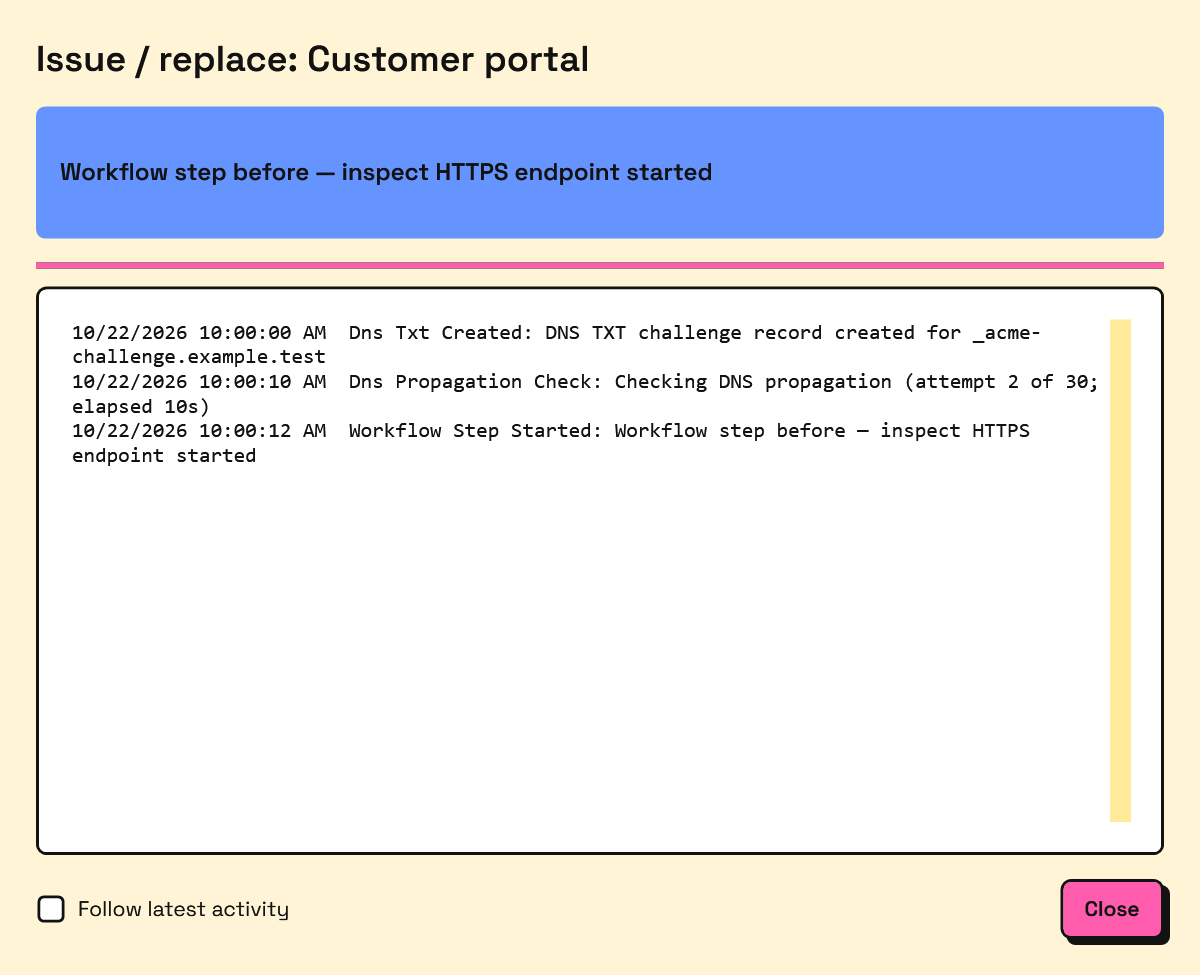
Example job data; timestamps and domains are illustrative.
Actual entries depend on the CA's authorization state and your selected steps; reused authorization or Install again may skip DNS work. Cleanup can appear before final certificate issuance, as individual authorizations finish.
| Entry or phase | Meaning |
|---|---|
| Checking DNS delegation | Confirming _acme-challenge.<domain> points to this credential's assigned destination. |
| Creating / created DNS TXT challenge record | Publishing the owned challenge through the scoped API; does not yet mean DNS is ready. |
| Checking DNS propagation | Looking for the expected TXT through DNS, with attempt count and elapsed time. |
| CA validation | Asking/waiting for the CA to validate authorization; the CA performs its own DNS checks. |
| Issuance | Finalizing/downloading and protecting the issued certificate locally; not proof that an application serves it. |
| Removing / removed DNS TXT challenge record | Cleaning up only this operation's owned challenge value. |
| Remove previous certificate from Windows store | After successful replacement confirmation, rechecks the replacement and removes the recorded predecessor when the removal conditions are met; otherwise reports retained: true with a reason. Separate from DNS TXT cleanup. |
| Installation / export | Writing or installing the issued artifact using the selected plan or modular steps. |
| Service restart / reload | Applying the configured service action; not by itself proof of HTTPS readiness. |
| Endpoint verification | Inspecting the served certificate, comparing thumbprints, or running configured TCP/HTTP checks. Read each result to see which was tested. |
DNS troubleshooting
The Agent prefers direct authoritative queries rather than OS/application answer caches. Public resolvers help discover authoritative servers. When public or authoritative DNS is unreachable, it can fall back to fresh wire queries to the device's configured DNS servers. Those recursive servers may still cache answers; reachable negative/conflicting authoritative answers cannot be overridden by fallback. TXT checks are spaced ten seconds apart, with at most 30 attempts and a five-minute propagation timeout. CNAME readiness also retries instead of failing on the first miss.
| Symptom | What to check |
|---|---|
| Incorrect CNAME target | Copy the exact displayed owner and destination; check provider-added zone suffixes, trailing dots, proxying, and conflicting records at the owner. Replacing a delegation may require a new target. |
| Authentication failure | Check that record ID and secret belong together, the delegation is active, and the HTTPS API base includes /api/v1. After rotation, replace the protected secret in the Agent. |
| Recursive resolver still shows old data | Compare with authoritative answers. OS cache flushing cannot clear a remote recursive cache; wait for its cached positive or negative answer to expire. |
| Authoritative servers disagree | Check every authoritative server for the domain and delegated target. Correct zone publication/replication; one updated server is not enough. Use the nameserver identified in Activity. |
| Propagation delay or timeout | Check CNAME readiness and delegation health separately from successful TXT API publication. Allow DNS publication to finish, then retry retained work rather than repeatedly creating policies/orders. |
| TTL confusion | TTL controls caching, not how quickly a provider publishes a zone. Lowering a TTL now does not expire an already cached answer early; negative caching can also delay visibility. |
| DNS servers unreachable | Check the job's failing nameserver, outbound DNS routing/firewall rules, and device DNS settings. Permit the required UDP/TCP DNS traffic. Fallback is for unreachable DNS, not a way to bypass conflicting authoritative results. |
| Two TXT values already present | Let the owning authorizations finish and their cleanup run. Confirm no second host uses the delegation; do not evict an active challenge. |
Propagation failures retain the order, CSR, and key for safe retry. Inspect the job's DNS error category and timing without copying secrets or TXT values into support notes.